8 Essential Network Protocols Every Developer Should Know
Network protocols define the rules that allow distributed systems to exchange data across local networks and the internet. They determine how connections are established, how data is transported, how failures are handled, and how communication is secured.
For developers working with web applications, distributed systems, APIs, cloud infrastructure, and real-time services, understanding these protocols is essential for making informed architectural decisions.
The following eight protocols cover several layers of modern network communication, from web requests and real-time connections to transport, email, and file transfer.
🌐 HTTP — HyperText Transfer Protocol #
HTTP is the application-layer protocol underlying the web. It defines how clients and servers exchange resources through a request-response model.
A client sends an HTTP request containing a method, target resource, headers, and optionally a body. The server responds with a status code, headers, and an optional response body.
Common HTTP methods include:
GET— Retrieve a resource.POST— Submit data or request resource creation.PUT— Replace a resource.PATCH— Partially modify a resource.DELETE— Remove a resource.
HTTP is used not only for web pages but also extensively for REST APIs, microservices, authentication endpoints, and cloud services.
⚡ HTTP/3 — HTTP Over QUIC #
HTTP/3 is the latest major version of HTTP and uses QUIC as its transport protocol instead of TCP.
QUIC runs over UDP while implementing transport features such as reliable delivery, congestion control, encryption, and stream multiplexing at the protocol level.
Key advantages include:
- Faster connection establishment.
- Reduced connection latency.
- Stream multiplexing without TCP-level head-of-line blocking.
- Improved behavior when network paths change.
- Better performance on mobile and unstable networks.
HTTP/3 is particularly useful for latency-sensitive applications and networks where connection quality changes frequently.
🔐 HTTPS — Secure HTTP #
HTTPS is HTTP transmitted through a secure TLS connection.
TLS provides encryption, authentication, and integrity protection, preventing attackers from simply reading or modifying application traffic in transit.
HTTPS is fundamental to modern web security and is used for:
- Secure websites.
- REST and HTTP APIs.
- Authentication and authorization flows.
- Payment systems.
- Service-to-service communication.
Modern HTTPS deployments typically use TLS 1.2 or TLS 1.3, with TLS 1.3 providing a more streamlined handshake and stronger default cryptographic design.
🔄 WebSocket — Full-Duplex Real-Time Communication #
WebSocket provides persistent, bidirectional communication between a client and server over a single TCP connection.
Unlike conventional HTTP request-response communication, WebSocket allows either side to send messages whenever necessary after the connection has been established.
Typical applications include:
- Real-time chat and messaging.
- Multiplayer gaming.
- Financial and trading dashboards.
- Live monitoring systems.
- Collaborative editing.
- Real-time notifications.
WebSocket is particularly useful when applications need continuous updates without repeatedly polling the server.
📦 TCP — Transmission Control Protocol #
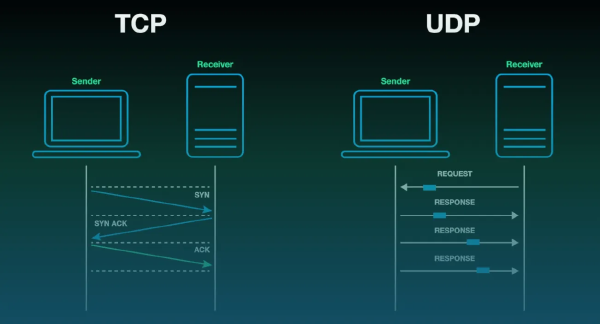
TCP is a connection-oriented transport-layer protocol that provides reliable and ordered byte-stream delivery over IP networks.
It handles mechanisms such as:
- Connection establishment.
- Retransmission of lost data.
- Packet ordering.
- Flow control.
- Congestion control.
- Error detection.
Because TCP prioritizes reliable delivery, it is widely used by application protocols where losing or reordering data is unacceptable.
HTTP/1.1, HTTP/2, SMTP, and many other protocols traditionally operate over TCP.
🚀 UDP — User Datagram Protocol #
UDP is a connectionless transport protocol designed with minimal overhead.
Unlike TCP, UDP does not inherently provide reliable delivery, ordering, retransmission, or congestion control. Applications therefore have to decide which guarantees they require.
This lower-level design makes UDP useful for latency-sensitive workloads where waiting for retransmission can be more harmful than losing an individual packet.
Common applications include:
- Voice over IP.
- Video conferencing.
- Online multiplayer gaming.
- DNS.
- Streaming and real-time media.
- QUIC-based protocols such as HTTP/3.
The key distinction is not simply that UDP is “faster” than TCP. Rather, UDP provides fewer transport guarantees, allowing applications and higher-level protocols to implement the reliability and delivery semantics they actually need.
✉️ SMTP — Simple Mail Transfer Protocol #
SMTP is the primary application-layer protocol used to send and relay email.
It handles the transmission of messages between mail clients and mail servers, as well as server-to-server email delivery.
SMTP is generally paired with other protocols for retrieving messages:
- IMAP — Provides synchronized access to mail stored on a server.
- POP3 — Primarily downloads messages from a mail server to a client.
In other words, SMTP is primarily concerned with sending and relaying email, while IMAP and POP3 address client-side message retrieval.
📁 FTP — File Transfer Protocol #
FTP is a traditional application-layer protocol for transferring files between clients and servers.
A classic FTP connection uses separate channels for:
- Control commands — Authentication and session management.
- Data transfer — Actual file and directory operations.
FTP remains relevant in legacy infrastructure and controlled environments, but its lack of built-in encryption makes it unsuitable for many modern security-sensitive deployments.
Common alternatives include:
- SFTP — File transfer over SSH.
- FTPS — FTP secured using TLS.
- HTTPS-based transfers — Often preferable for modern web and API architectures.
Understanding FTP remains useful when maintaining older systems or integrating with infrastructure that still depends on traditional file-transfer workflows.
🧭 How These Protocols Fit Together #
These protocols operate at different layers and solve different networking problems.
A simplified relationship looks like this:
Application Layer
├── HTTP / HTTP/3
├── HTTPS
├── WebSocket
├── SMTP
└── FTP
        ↓
Transport Layer
├── TCP
└── UDP
        ↓
Internet Layer
└── IP
The distinction between application and transport protocols is particularly important when designing distributed systems.
For example, HTTP/1.1 and HTTP/2 typically rely on TCP, while HTTP/3 uses QUIC over UDP. WebSocket traditionally uses TCP, while real-time applications may use UDP-based protocols when minimizing latency is more important than guaranteed delivery.
Understanding these relationships makes it easier to diagnose performance problems, choose appropriate communication patterns, and reason about security and reliability across the network stack.