Private vs. Public IP Addresses: IPv4, IPv6, and NAT Explained
An IP address (Internet Protocol address) is a numerical identifier assigned to a network interface, enabling devices to communicate across local networks and the global internet. IP addressing is fundamental to how modern networks identify endpoints, route packets, and establish communication between systems.
There are two major versions of the Internet Protocol in widespread use:
- IPv4: Uses 32-bit addresses, typically represented in dotted-decimal notation, such as
192.168.1.1. Its address space contains approximately 4.29 billion possible values. - IPv6: Uses 128-bit addresses, represented in hexadecimal notation, such as
2001:db8::1. Its enormous address space provides approximately \(3.4 \times 10^{38}\) possible addresses.
Within both addressing systems, it is important to distinguish between addresses intended for local communication and those used for global network routing.
This distinction leads to two commonly used concepts: private IP addresses and public IP addresses.
Private addresses allow organizations and home networks to reuse address space internally, while public addresses provide globally coordinated addressing for internet communication. Network Address Translation (NAT) connects these two addressing environments in many IPv4 deployments.
This guide explains IPv4 private and public address ranges, IPv6 address types, NAT, and the practical differences network engineers and infrastructure developers need to understand.
🏠 Private IP Address Ranges: IPv4 RFC 1918 #
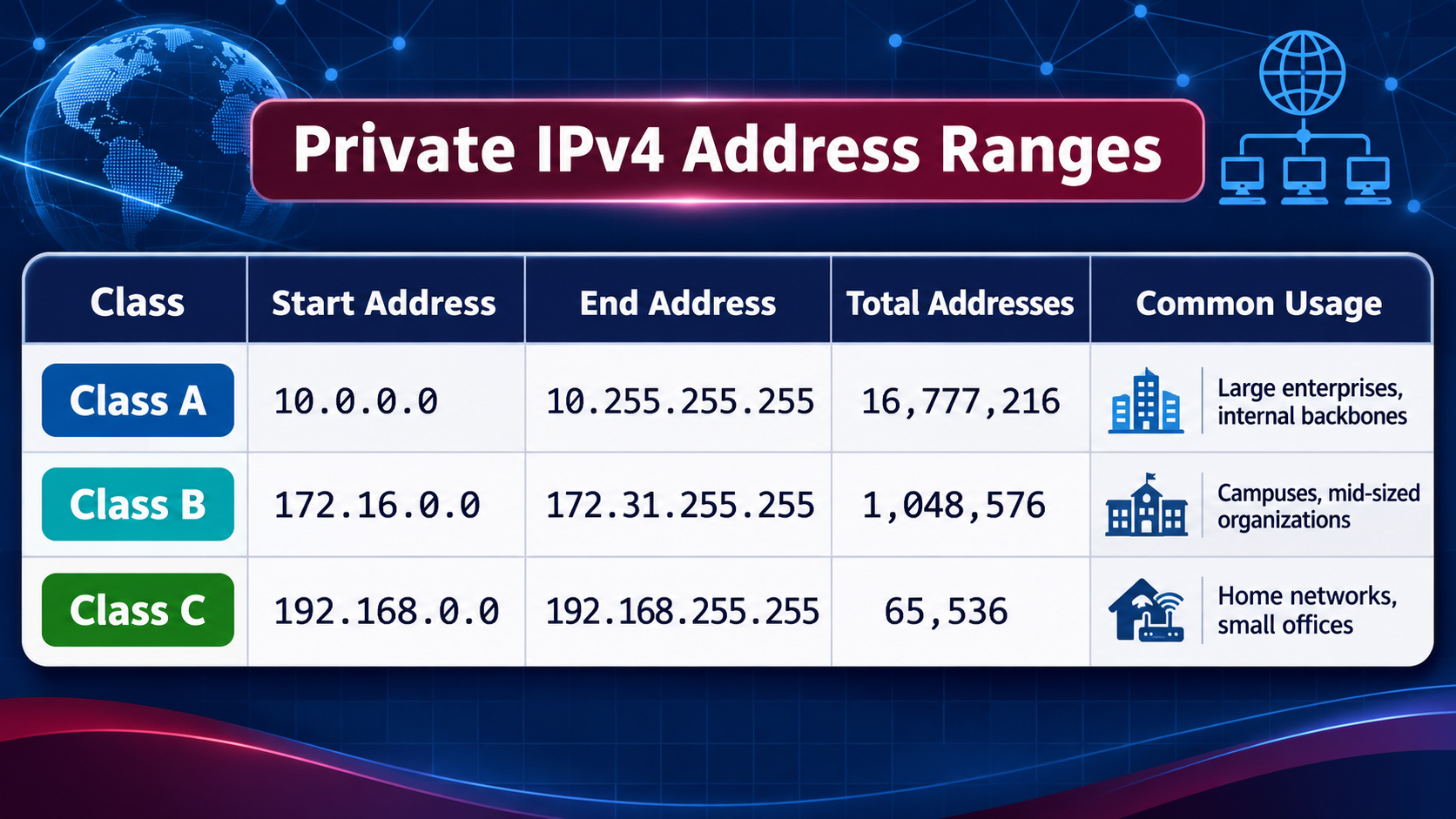
Private IP addresses are reserved for communication within private networks. They are not intended to be routed across the public internet.
This allows millions of independent networks to reuse the same address ranges without requiring globally unique addresses for every internal device.
For example, two unrelated companies can both use 192.168.1.10 for an internal server. Because their networks are independently administered, the duplicate address does not create a conflict unless the networks are interconnected without appropriate address translation or renumbering.
The Internet Engineering Task Force (IETF) formally defines three IPv4 private address blocks in RFC 1918: Address Allocation for Private Internets.
IPv4 Private Address Blocks #
The three reserved private IPv4 ranges are:
| Historical Class | CIDR Range | Start Address | End Address | Total Addresses |
|---|---|---|---|---|
| Class A | 10.0.0.0/8 |
10.0.0.0 | 10.255.255.255 | 16,777,216 |
| Class B | 172.16.0.0/12 |
172.16.0.0 | 172.31.255.255 | 1,048,576 |
| Class C | 192.168.0.0/16 |
192.168.0.0 | 192.168.255.255 | 65,536 |
Note: Class A, B, and C are historical classful addressing terms retained here for familiarity. Modern IP network design uses Classless Inter-Domain Routing (CIDR), which defines address blocks through prefix lengths rather than traditional address classes.
These ranges provide different address capacities depending on the size and requirements of the network.
1. 10.0.0.0/8: Large Private Networks #
The 10.0.0.0/8 block provides 16,777,216 IPv4 addresses.
It is commonly used in:
- Large enterprise networks.
- Corporate internal backbones.
- Cloud infrastructure.
- Data center networks.
- Large-scale Kubernetes and container environments.
Its large address capacity makes it suitable for organizations operating thousands or millions of internal network endpoints.
2. 172.16.0.0/12: Medium-Sized Private Networks #
The 172.16.0.0/12 block contains addresses from 172.16.0.0 through 172.31.255.255.
It provides 1,048,576 addresses and is commonly used for:
- Enterprise campus networks.
- Departmental network segmentation.
- Internal application infrastructure.
- Virtual private networks.
- Container and cloud networking.
One common source of configuration mistakes is assuming that the entire 172.0.0.0/8 range is private.
Only 172.16.0.0/12 is reserved for private use. For example, 172.15.0.1 and 172.32.0.1 are outside this private block.
3. 192.168.0.0/16: Home and Small Office Networks #
The 192.168.0.0/16 block contains 65,536 addresses.
It is widely used in:
- Home broadband routers.
- Small business networks.
- Wireless LANs.
- Local development environments.
- Consumer networking devices.
Common examples include:
192.168.0.1192.168.1.1192.168.1.100192.168.10.1
Many home routers use 192.168.1.0/24 or 192.168.0.0/24 as their default LAN subnet.
Why Private IP Addresses Are Not Publicly Routable #
Private IPv4 addresses are intentionally excluded from normal public internet routing.
An internet router generally does not forward packets with RFC 1918 source or destination addresses across the public internet.
This prevents internal address spaces from conflicting with globally allocated public address space.
However, private addresses can still be routed within:
- Corporate LANs.
- Site-to-site VPNs.
- Virtual private clouds.
- Data center fabrics.
- Private WAN environments.
The restriction applies to public internet routing, not to routing within private networks.
🌍 Public IP Address Ranges: Global Internet Connectivity #
Public IP addresses are globally allocated addresses used for communication across the internet.
Unlike RFC 1918 private addresses, public IPv4 addresses are intended to be globally unique within the public routing environment.
They are coordinated by the Internet Assigned Numbers Authority (IANA) and distributed through five Regional Internet Registries (RIRs):
- ARIN: North America and parts of the Caribbean.
- RIPE NCC: Europe, the Middle East, and Central Asia.
- APNIC: Asia-Pacific.
- LACNIC: Latin America and parts of the Caribbean.
- AFRINIC: Africa and parts of the Indian Ocean.
These organizations allocate address resources to network operators, ISPs, enterprises, and other eligible organizations.
Understanding Public IPv4 Address Space #
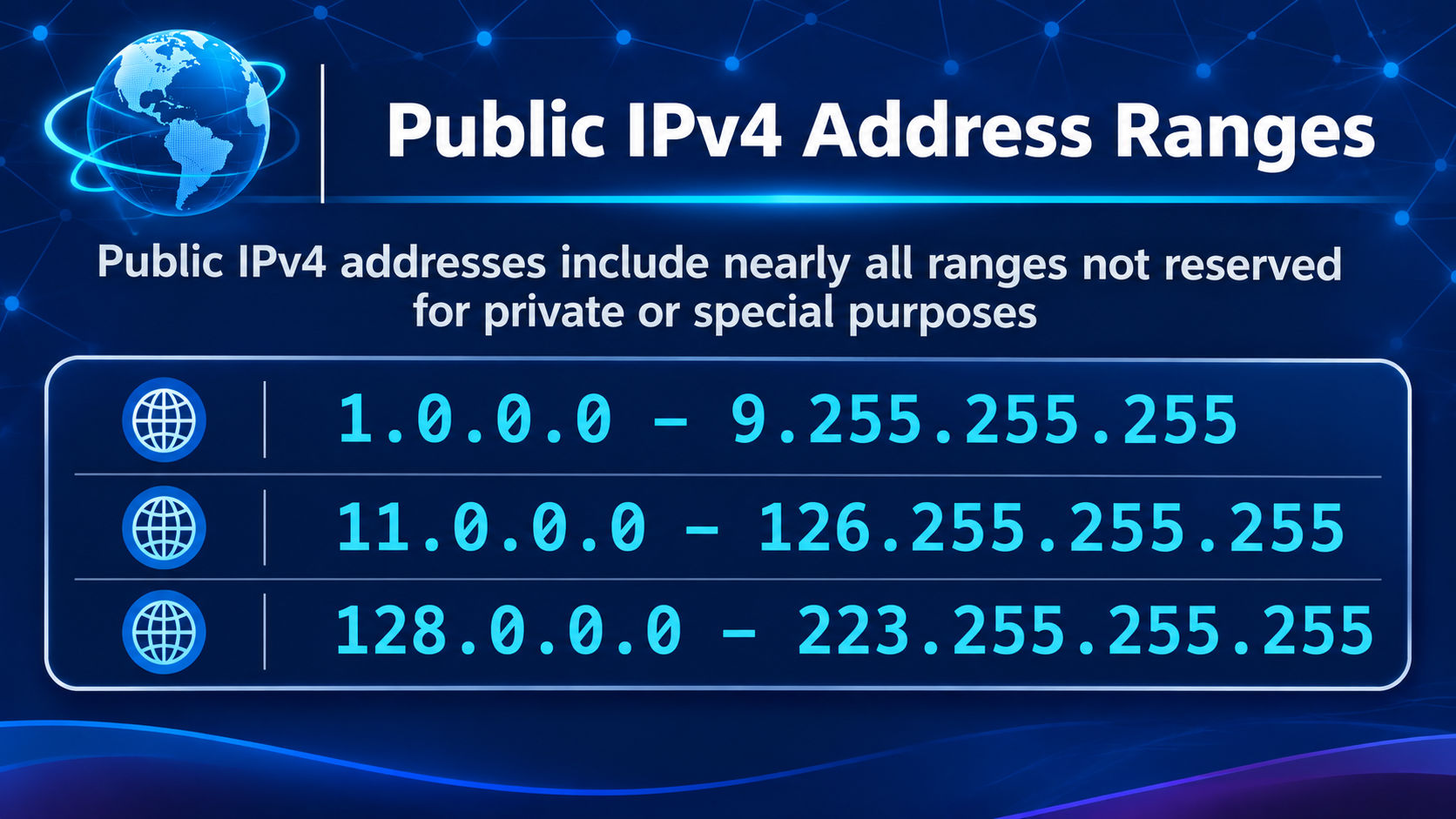
Public IPv4 addresses generally refer to globally allocated unicast addresses that are not reserved for private or other special purposes.
Unlike RFC 1918 private addressing, public IPv4 space cannot be accurately represented as a few simple continuous ranges.
For example, it would be incorrect to assume that every IPv4 address outside the three private ranges is publicly routable.
Several other address blocks are reserved for technical purposes, testing, benchmarking, multicast, and shared addressing.
The following distinctions are important:
| Address Category | Example | Purpose |
|---|---|---|
| Private | 10.0.0.1 |
Internal network communication |
| Private | 172.16.0.1 |
Internal network communication |
| Private | 192.168.1.1 |
Home and enterprise LANs |
| Public | 8.8.8.8 |
Globally reachable DNS service address |
| Shared Address Space | 100.64.0.1 |
Carrier-grade NAT infrastructure |
| Loopback | 127.0.0.1 |
Local host communication |
| Link-Local | 169.254.1.1 |
Local-link communication |
A public IP address does not automatically guarantee that a device is reachable from the internet. Routing policies, firewalls, access-control rules, and service configuration still determine actual connectivity.
Special-Use IPv4 Addresses #
Several IPv4 address ranges have special purposes and should not be confused with ordinary private or public addresses.
| Address Range | CIDR | Purpose |
|---|---|---|
127.0.0.0 – 127.255.255.255 |
127.0.0.0/8 |
Loopback |
169.254.0.0 – 169.254.255.255 |
169.254.0.0/16 |
Link-Local |
100.64.0.0 – 100.127.255.255 |
100.64.0.0/10 |
Shared Address Space |
192.0.2.0 – 192.0.2.255 |
192.0.2.0/24 |
Documentation |
198.18.0.0 – 198.19.255.255 |
198.18.0.0/15 |
Network benchmarking |
198.51.100.0 – 198.51.100.255 |
198.51.100.0/24 |
Documentation |
203.0.113.0 – 203.0.113.255 |
203.0.113.0/24 |
Documentation |
224.0.0.0 – 239.255.255.255 |
224.0.0.0/4 |
Multicast |
240.0.0.0 – 255.255.255.254 |
240.0.0.0/4 |
Reserved for future use |
Some particularly important examples deserve additional explanation.
Loopback: 127.0.0.0/8
Loopback addresses allow a machine to communicate with itself without sending packets through an external network interface.
The most familiar address is 127.0.0.1, commonly associated with localhost.
Link-Local: 169.254.0.0/16
IPv4 link-local addresses are used for communication within a local network segment.
They can be automatically configured through IPv4 Link-Local Addressing when normal address configuration is unavailable.
For example, a device may assign itself an address such as 169.254.20.15 when it cannot obtain an IPv4 address through DHCP.
Shared Address Space: 100.64.0.0/10
This range is reserved for Carrier-Grade NAT (CGNAT) deployments.
It allows ISPs to assign shared addresses to customers before translating their traffic to globally routable public IPv4 addresses.
Importantly, this block is neither RFC 1918 private address space nor ordinary public IPv4 space.
Documentation Addresses
The ranges 192.0.2.0/24, 198.51.100.0/24, and 203.0.113.0/24 are reserved for documentation and examples.
They are useful when writing technical guides, demonstrating network configurations, or preparing sample routing policies without using real production addresses.
For the authoritative allocation and reservation details, refer to the IANA IPv4 Special-Purpose Address Registry.
🔄 Network Address Translation: How Private IPs Access the Internet #
Network Address Translation (NAT) allows devices using private IPv4 addresses to communicate with external networks through a router or gateway.
Without NAT or another translation/proxy mechanism, RFC 1918 source addresses cannot be used as ordinary globally routed internet addresses.
NAT is therefore widely deployed in home networks, enterprise environments, and service-provider infrastructure.
How NAT Works #
Consider a simple home network:
                 Public Internet
                        |
                        |
                Public IP Address
                  203.0.113.10
                        |
                +---------------+
                | NAT Router    |
                |               |
                | WAN: Public IP|
                | LAN: 192.168.1.1
                +-------+-------+
                        |
                  Private LAN
                        |
          +-------------+-------------+
          |             |             |
          v             v             v
     192.168.1.10  192.168.1.20  192.168.1.30
       Laptop        Desktop       Server
When a device sends traffic to the internet, the router typically performs Source NAT (SNAT) or Network Address and Port Translation (NAPT).
For example:
- A laptop sends a packet from
192.168.1.10to an external web server. - The router receives the packet from the private LAN.
- The router replaces the private source address with its public-facing address.
- The packet is forwarded to the internet.
- The external server sends its response to the public address.
- The router uses its connection-tracking or translation table to identify the original internal client.
- The response is forwarded to
192.168.1.10.
This mechanism allows multiple devices to share a single public IPv4 address.
SNAT vs. DNAT #
Two common forms of NAT are Source NAT and Destination NAT.
| NAT Type | Function | Typical Application |
|---|---|---|
| SNAT | Modifies the source IP address | Private clients accessing the internet |
| DNAT | Modifies the destination IP address | Port forwarding and inbound service access |
| MASQUERADE | Dynamic form of source NAT | Internet access through dynamically assigned WAN addresses |
| NAPT/PAT | Translates IP addresses and transport-layer ports | Multiple clients sharing one public IPv4 address |
For example, when a home user accesses a public website, the router typically uses source NAT.
When an administrator configures port forwarding to expose an internal web server, the router uses destination NAT to forward incoming connections to the appropriate private address.
For a deeper packet-level explanation, see Linux NAT and Port Forwarding Explained, which covers SNAT, DNAT, masquerading, IP forwarding, and Linux netfilter.
Carrier-Grade NAT (CGNAT) #
Traditional NAT usually happens at the customer router.
However, IPv4 address exhaustion has encouraged many ISPs to introduce an additional translation layer called Carrier-Grade NAT.
A simplified CGNAT architecture looks like this:
       Home Network
             |
       192.168.1.100
             |
        Home Router
             |
       100.64.0.10
             |
       ISP CGNAT Gateway
             |
       Public IPv4 Address
          203.0.113.20
             |
        Public Internet
In this example:
- The home device uses an RFC 1918 private address.
- The customer router performs local NAT.
- The ISP assigns an address from
100.64.0.0/10. - The ISP’s CGNAT gateway translates the traffic to a globally routable public IPv4 address.
CGNAT allows an ISP to serve many customers using a limited pool of public IPv4 addresses.
However, it can complicate inbound connectivity.
For example, hosting a publicly accessible game server, web server, or remote-access service may require additional arrangements when the customer is behind CGNAT.
🌐 IPv6 Addressing: Private and Public Address Types #
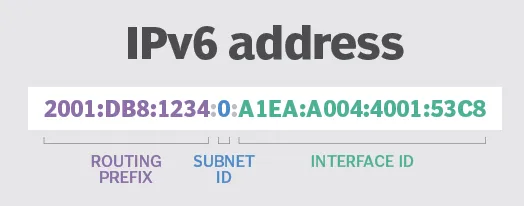
IPv6 was designed to address the limitations of IPv4, especially its restricted address space.
With 128-bit addressing, IPv6 provides an enormous number of unique addresses, reducing the need for address sharing through NAT.
However, IPv6 still distinguishes between globally routable addresses and addresses intended for local communication.
Unlike IPv4, IPv6 uses several explicitly defined address scopes and types.
1. Global Unicast Addresses (GUA) #
Global Unicast Addresses are IPv6 addresses intended for globally routed communication.
The currently allocated global unicast address block is:
2000::/3Addresses in this range are used by internet-facing systems, cloud infrastructure, servers, and network interfaces that require globally routed IPv6 connectivity.
An example of a documentation-only IPv6 address is:
2001:db8::1The 2001:db8::/32 range is reserved for documentation and should not be used as a real public production address.
Global Unicast Addresses provide globally unique addressing without requiring the same address-sharing model commonly used with IPv4 NAT.
However, global addressing does not automatically mean unrestricted reachability. Firewalls, routing policies, and security controls still determine whether a remote system can communicate with an IPv6 endpoint.
2. Unique Local Addresses (ULA) #
Unique Local Addresses are IPv6 addresses intended for private communication within an organization or site.
Their defined address block is:
fc00::/7In common deployments, locally generated ULAs use:
fd00::/8ULA addresses are designed to provide highly likely global uniqueness, even though they are not intended for public internet routing.
They are useful for:
- Enterprise internal networks.
- Private cloud infrastructure.
- Data center communication.
- Site-to-site VPN environments.
- Internal application services.
Unlike IPv4 private addresses, IPv6 ULAs are designed with a pseudo-random Global ID to reduce the likelihood of collisions when independently managed networks are interconnected.
An example ULA address is:
fd12:3456:789a:1::10The important distinction is that fc00::/7 is the defined ULA block, while fd00::/8 represents the locally assigned portion commonly used in practice.
3. Link-Local Addresses #
IPv6 link-local addresses are automatically configured on IPv6-enabled interfaces.
The reserved range is:
fe80::/10Link-local addresses support communication within a single network link and are essential for IPv6 functions such as Neighbor Discovery and router discovery.
Examples include:
fe80::1
fe80::200:5aee:feaa:20a2
Unlike Global Unicast and Unique Local Addresses, link-local addresses are not forwarded by routers to other network links.
They are therefore unsuitable for communication across routed networks without another addressing mechanism.
IPv6 Address Type Summary #
| IPv6 Address Type | Prefix | Purpose | Public Internet Routing |
|---|---|---|---|
| Global Unicast | 2000::/3 |
Globally routed communication | Intended for global routing |
| Unique Local Address | fc00::/7 |
Private organizational networking | Not intended |
| Link-Local | fe80::/10 |
Communication within one link | Not forwarded by routers |
| Loopback | ::1/128 |
Local host communication | Not applicable |
| Unspecified | ::/128 |
Indicates the absence of an address | Not applicable |
| Multicast | ff00::/8 |
One-to-many communication | Scope-dependent |
Why IPv6 Reduces the Need for NAT #
One of the major architectural advantages of IPv6 is that networks can assign globally unique addresses to their interfaces without relying on IPv4-style address sharing.
A typical IPv6 deployment can provide:
- Global Unicast Addresses for internet connectivity.
- Unique Local Addresses for internal communication.
- Link-Local Addresses for local-link operations.
This makes end-to-end connectivity easier to establish.
However, eliminating the requirement for NAT does not mean eliminating network security controls.
Firewalls and access-control policies remain essential because a globally addressed IPv6 device must still be protected against unauthorized inbound connections.
📊 Private IP vs. Public IP: Key Differences #
Private and public IP addresses serve different purposes in modern network architecture.
The following table summarizes their main characteristics:
| Feature | Private IP Address | Public IP Address |
|---|---|---|
| Scope | Internal network | Global internet |
| Uniqueness | Unique within the relevant private network | Globally coordinated |
| Public Internet Routing | Not globally routable | Intended for global routing |
| Common Usage | LANs, enterprise networks, private clouds | Websites, internet services, public infrastructure |
| IPv4 Examples | 10.0.0.1, 172.16.0.1, 192.168.1.1 |
8.8.8.8 |
| Address Allocation | Defined by private-use reservations or internal planning | Allocated through IANA and RIR systems |
| Internet Connectivity | Usually uses NAT, a proxy, or a gateway | Can communicate directly subject to routing and security policies |
| Security | Requires network access controls | Also requires firewalls and access controls |
Practical Example #
Consider a company operating an internal application server:
Private Server:
192.168.10.100

Public Gateway:
203.0.113.10
The server uses a private address for internal communication.
When it accesses an external service, the company’s gateway can translate the source address to a public IPv4 address.
If the company wants external users to access the application server, it can configure an appropriate public-facing service through a firewall, reverse proxy, load balancer, or destination NAT rule.
With IPv6, the server may instead have a Global Unicast Address and communicate directly over IPv6, subject to firewall and routing policies.
🛠 How to Identify Private and Public IP Addresses #
Understanding IP ranges is useful when configuring servers, diagnosing network problems, and troubleshooting connectivity.
1. Check Local IP Addresses on Linux #
The modern Linux ip command can display IPv4 and IPv6 addresses assigned to network interfaces.
Display all interfaces:
ip addr showDisplay IPv4 addresses only:
ip -4 addr showDisplay IPv6 addresses only:
ip -6 addr showCheck a specific interface:
ip addr show eth0A typical interface configuration might look like:
2: eth0: <BROADCAST,MULTICAST,UP,LOWER_UP>
    inet 192.168.1.100/24 brd 192.168.1.255 scope global eth0
    inet6 fe80::1234:5678:abcd:ef01/64 scope link
In this example:
192.168.1.100/24is an IPv4 private address.fe80::1234:5678:abcd:ef01/64is an IPv6 link-local address.
For additional Linux networking commands, see 3 Ways to Find IP Addresses in Linux, which covers ip addr, ifconfig, and hostname -I.
2. Check Your Public IPv4 Address #
You can query an external IP discovery service to determine the public IPv4 address observed by the service.
For example:
curl -4 https://api.ipify.orgTo query the public IPv6 address:
curl -6 https://api64.ipify.orgThese commands report the address visible to the remote service, which may belong to a NAT gateway, enterprise proxy, or ISP-level CGNAT infrastructure rather than directly to the local interface.
3. Inspect the Routing Table #
IP addresses alone do not explain how packets reach their destinations.
Routing information is also important.
On Linux, use:
ip routeFor IPv6:
ip -6 routeThese commands display routing entries, including default gateways and connected network prefixes.
A correctly configured private address does not guarantee internet connectivity if the routing table or gateway configuration is incorrect.
🔐 Security Considerations: Private IP Does Not Mean Automatically Secure #
A common misconception is that private IP addresses are inherently secure because they are not directly routable across the public internet.
In reality, private addressing is primarily an addressing and routing mechanism, not a complete security solution.
Private networks still require appropriate security controls, including:
- Firewall policies.
- Network segmentation.
- Access-control lists (ACLs).
- Authentication and authorization.
- VPN security.
- Monitoring and intrusion detection.
Similarly, public IP addresses do not automatically expose every service running on a host.
A public-facing server can use strict firewall policies to allow only the traffic required by its applications.
For IPv6 deployments, this distinction becomes especially important because globally addressed interfaces do not necessarily sit behind traditional NAT boundaries.
NAT should not be treated as a replacement for a firewall. Security depends on explicit access-control policies regardless of whether an endpoint uses a private or public address.
🧭 Conclusion #
Private and public IP addresses are fundamental components of modern internet architecture.
IPv4 private addressing, defined by RFC 1918, allows organizations and home networks to reuse address space internally. Public IPv4 addresses provide globally coordinated addressing for internet communication, while NAT bridges the two environments in many deployments.
IPv6 introduces a much larger address space and provides distinct address types for different communication requirements:
- Global Unicast: Globally routed IPv6 communication.
- Unique Local Addresses: Internal communication within private networks.
- Link-Local: Communication restricted to an individual network link.
Understanding these distinctions is essential for network administrators, infrastructure engineers, cloud architects, and developers working with modern distributed systems.
As networks increasingly adopt IPv6, the traditional distinction between private and public addressing remains relevant, but the implementation is evolving toward globally unique addressing with explicit routing and security controls.
Ultimately, effective network design requires more than choosing an IP address. It requires understanding address allocation, subnetting, routing, NAT, and security policies as interconnected parts of the same networking architecture.