Linux Kernel Compilation and Module Development Guide
Compiling the Linux kernel and developing kernel-level code requires understanding the boundary between user space, kernel space, hardware, and the build system that connects them.
This guide covers the practical workflow for obtaining and compiling Linux kernel sources, building loadable kernel modules, cross-compiling for other architectures, adding a custom system call, and examining the architecture of Linux 0.11 as a compact example of early x86 operating-system design.
The modern Linux kernel provides extensive abstractions around process scheduling, virtual memory, filesystems, networking, devices, and system calls. By contrast, Linux 0.11 exposes many of the underlying mechanisms more directly, making it useful for studying boot-time initialization, protected mode, paging, interrupt handling, and early process management.
🧩 Linux Kernel Architecture and Core Subsystems #
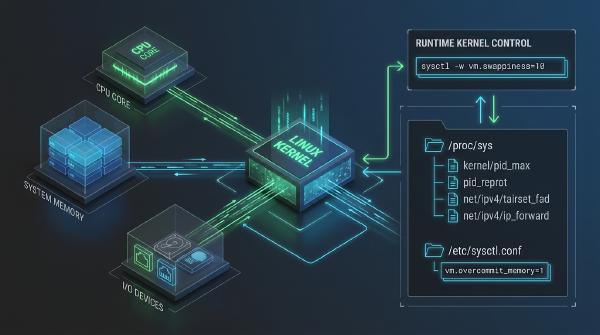
The Linux kernel acts as the privileged resource-management layer between hardware and user-space software.
Applications normally interact with kernel functionality through system calls and standardized interfaces rather than accessing hardware directly.
Process Management #
The process-management subsystem handles process and thread creation, scheduling, context switching, synchronization, and termination.
The scheduler determines which runnable tasks receive CPU time, while kernel synchronization primitives coordinate access to shared resources.
This subsystem provides the foundation for Linux’s preemptive multitasking model.
Memory Management #
The memory-management subsystem provides isolated virtual address spaces for processes and controls the mapping between virtual addresses and physical memory.
Its responsibilities include:
- Virtual memory management
- Page allocation and reclamation
- Address-space management
- Memory mapping
- Page-cache management
- Swap handling
- Memory protection
- Kernel memory allocation
Virtual memory allows applications to operate within independent address spaces while the kernel controls how those addresses map onto physical memory.
Virtual File System #
The Virtual File System (VFS) provides a common abstraction for file and directory operations.
Applications can use standard interfaces such as open(), read(), write(), and close() without needing to understand the internal implementation of the underlying filesystem.
This abstraction allows Linux to support filesystem implementations such as ext4, XFS, and Btrfs through a common API.
Networking Subsystem #
The networking subsystem processes packets and provides socket-based interfaces to user-space applications.
It includes:
- Network interfaces
- Socket APIs
- TCP/IP protocol implementations
- Routing
- Packet filtering
- Traffic control
- Network namespaces
Applications can therefore interact with network resources through standardized interfaces while the kernel handles protocol processing and hardware interaction.
Device Drivers #
Device drivers connect kernel abstractions to physical hardware.
Examples include drivers for:
- NVMe and SATA storage
- Ethernet and Wi-Fi adapters
- GPUs
- USB devices
- Input devices
- Audio hardware
Drivers handle device initialization, command submission, interrupts, DMA, power management, and other hardware-specific operations.
System Call Layer #
System calls form the controlled interface through which user-space programs request privileged kernel services.
Operations such as process creation, file access, memory mapping, and network communication ultimately rely on kernel-provided interfaces.
The system-call boundary is therefore both an API boundary and an important security boundary: user-space code cannot arbitrarily execute privileged kernel operations or access protected hardware resources.
🛠️ Development Environment and Kernel Source #
Before compiling kernel code or external modules, establish a suitable build environment.
For Ubuntu or Debian-based systems, a basic development environment can be installed with:
sudo apt-get update
sudo apt-get install build-essential openssl zlibc minizip libidn11-dev libidn11 libncurses-dev
For kernel development, additional dependencies may be required depending on the kernel version, enabled configuration options, target architecture, and build workflow.
Using a virtual machine is often preferable when experimenting with custom kernels because kernel-development mistakes can cause system crashes or prevent the test environment from booting.
Obtaining Kernel Sources #
Official Linux kernel source releases are available from kernel.org.
After downloading a source archive such as:
linux-x.y.z.tar.xzit can be extracted with:
xz -d linux-x.y.z.tar.xz
tar -xvf linux-x.y.z.tar
cd linux-x.y.z
Modern tar implementations can also extract .tar.xz archives directly:
tar -xf linux-x.y.z.tar.xzThe extracted source tree contains the kernel’s architecture-specific code, core subsystems, drivers, filesystem implementations, build infrastructure, and configuration metadata.
🔌 Developing Linux Kernel Modules #
Loadable kernel modules provide a mechanism for adding functionality to a running kernel without statically compiling every component into the kernel image.
Typical use cases include device drivers, filesystem components, and other kernel extensions.
A kernel module is commonly built as a .ko file.
Basic Kernel Module Structure #
A minimal module includes the module API, initialization and cleanup callbacks, and licensing metadata:
#include <linux/module.h>
#include <linux/kernel.h>
#include <linux/init.h>

MODULE_LICENSE("GPL");
MODULE_AUTHOR("Developer");
MODULE_DESCRIPTION("Sample Kernel Module");
MODULE_VERSION("1.0");

static int __init my_module_init(void)
{
    pr_info("Module loaded into kernel space\n");
    return 0;
}

static void __exit my_module_exit(void)
{
    pr_info("Module unloaded\n");
}

module_init(my_module_init);
module_exit(my_module_exit);
The module_init() macro identifies the function executed when the module is loaded.
Similarly, module_exit() identifies the cleanup function executed when the module is removed.
Using pr_info() is generally preferable to calling printk() directly for ordinary informational messages because it uses the kernel’s higher-level logging interface.
Kernel Module Makefile #
An external module can be built using the kernel’s Kbuild infrastructure:
obj-m += my_module.o

all:
	make -C /lib/modules/$(shell uname -r)/build M=$(PWD) modules

clean:
	make -C /lib/modules/$(shell uname -r)/build M=$(PWD) clean
Important: Makefile recipe commands must begin with a literal Tab character, not spaces.
The M=$(PWD) parameter tells Kbuild where the external module source resides.
A typical build produces:
my_module.kowhich can then be loaded into a compatible kernel.
Building and Testing a Module #
A typical workflow is:
make
sudo insmod my_module.ko
lsmod | grep my_module
dmesg | tail
sudo rmmod my_module
The module must be built against a compatible kernel configuration and kernel build tree.
On distributions with module-signing enforcement enabled, an unsigned module may be rejected even when compilation succeeds.
🏗️ Kernel Build Parameters and Cross-Compilation #
The Linux build system supports several important parameters for non-native builds and isolated build directories.
Cross-Compilation #
For an ARM target, a cross-compilation command can specify both the target architecture and compiler prefix:
make ARCH=arm CROSS_COMPILE=arm-linux-The exact cross-compiler prefix depends on the toolchain being used. Modern ARM targets may use prefixes such as aarch64-linux-gnu- rather than arm-linux-.
The important distinction is that ARCH selects the kernel architecture while CROSS_COMPILE identifies the toolchain prefix.
External Build Directory #
Kernel build artifacts can be separated from the source tree using O=:
make O=../build-kernelThis is particularly useful when maintaining multiple configurations or target builds from the same source tree.
For example:
make O=../build-kernel menuconfig
make O=../build-kernel -j$(nproc)
The source tree remains relatively clean while generated files are stored in the external build directory.
Verbose Build Output #
The V parameter controls build verbosity:
make V=1or:
make V=2Verbose output is useful when debugging compiler flags, linker commands, generated files, include paths, or architecture-specific build behavior.
⚙️ Building a Custom Linux Kernel #
A full kernel build generally involves configuration, compilation, module installation, and installation of the resulting kernel image.
A simplified workflow is:
| Step | Action | Example Command |
|---|---|---|
| 1 | Clean source/build state | make mrproper |
| 2 | Configure kernel | make menuconfig |
| 3 | Compile kernel image | make -j$(nproc) |
| 4 | Build/install modules | make modules_install |
| 5 | Install kernel | make install |
Cleaning the Source Tree #
mrproper performs a more comprehensive cleanup than ordinary build cleanup:
make mrproperIt can remove generated files and configuration artifacts, including .config.
Because of that, preserve any configuration you need before running it.
Kernel Configuration #
The ncurses-based configuration interface can be launched with:
make menuconfigThis allows developers to configure processor support, filesystems, networking, drivers, debugging facilities, security features, and other kernel components.
The resulting configuration is normally stored in:
.configFor reproducible builds, preserving and version-controlling the relevant configuration is often more useful than relying on an interactive configuration process every time.
Compiling the Kernel #
The kernel can be compiled using all available processor threads:
make -j$(nproc)On x86 systems, a bootable kernel image may also be generated explicitly with:
make bzImage -j$(nproc)The exact target depends on the architecture and kernel version.
Installing Kernel Modules #
After successful compilation:
sudo make modules_installThis installs the built modules into the appropriate /lib/modules/<kernel-release>/ directory.
Installing the Kernel #
The kernel can then be installed with:
sudo make installOn distributions using GRUB and distribution-specific kernel packaging, additional bootloader or initramfs handling may occur outside the raw upstream make install workflow.
For production systems, distribution-native kernel packaging is often preferable because it integrates more cleanly with package management and bootloader configuration.
📞 Adding a Custom System Call #
Adding a custom system call is a useful educational exercise because it demonstrates how user-space requests cross the kernel boundary.
The exact implementation differs substantially between kernel versions, so paths and syscall registration mechanisms should always be checked against the specific kernel source being modified.
Implement the System Call #
A conceptual implementation might look like:
asmlinkage long sys_helloworld(void)
{
    pr_info("Hello world from custom syscall!\n");
    return 1;
}
The function should follow the calling conventions and syscall implementation conventions required by the target kernel version.
Declare the Interface #
The syscall implementation must be made visible to the relevant kernel declarations according to the source tree’s conventions.
For older or educational kernel trees, this may involve a declaration such as:
asmlinkage long sys_helloworld(void);The exact header location is version-dependent.
Register the System Call #
On an x86-64 kernel using a traditional syscall table layout, an entry may conceptually resemble:
333 64 helloworld sys_helloworldHowever, syscall numbers are kernel-version and architecture specific.
A hard-coded value such as 333 should never be assumed to be universally available. The appropriate unused syscall number must be selected from the target kernel’s actual syscall table.
Rebuild and Test #
After modifying the kernel source, rebuild and install the kernel before testing the new interface.
A user-space test can invoke the syscall through the generic syscall() interface:
#include <unistd.h>
#include <sys/syscall.h>

long result = syscall(SYS_helloworld);
If a custom numeric syscall identifier is being used for experimentation, the number must correspond exactly to the syscall table entry for the running kernel.
The test program should also validate the return value and inspect kernel logs when debugging the implementation.
🧬 Rebuilding Linux 0.11 #
Modern Linux is an enormous and highly modular codebase. Linux 0.11, by comparison, provides a compact environment for understanding the mechanisms involved in booting and initializing an early x86 kernel.
Studying its source reveals how the system transitions from firmware-loaded real-mode code into protected mode and eventually into C-based kernel initialization.
A simplified boot flow is:
+-----------------------------------------------------------------------+
| 1. bootsect.s  | BIOS loads 512B sector -> Initial boot setup        |
+-----------------------------------------------------------------------+
        |
        v
+-----------------------------------------------------------------------+
| 2. head.s      | Protected Mode -> IDT, GDT, paging initialization    |
+-----------------------------------------------------------------------+
        |
        v
+-----------------------------------------------------------------------+
| 3. main.c      | Process, memory, interrupts, filesystem setup        |
+-----------------------------------------------------------------------+
bootsect.s: Initial Boot Code #
bootsect.s contains the early 16-bit real-mode boot code.
The BIOS loads the boot sector into memory and transfers execution to it. The boot sector then performs the initial processor and disk setup required to load the remaining kernel components.
This stage operates under severe size constraints because the traditional boot sector is limited to 512 bytes.
The boot code therefore focuses on initialization and loading rather than implementing the full kernel.
head.s: Protected Mode Transition #
head.s performs critical low-level CPU initialization.
Its responsibilities include setting up structures such as:
- Global Descriptor Table (GDT)
- Interrupt Descriptor Table (IDT)
- Page tables
- Protected-mode execution environment
The transition from real mode to protected mode fundamentally changes how the processor handles memory addressing, privilege levels, and interrupts.
Paging then provides the foundation for virtual memory.
main.c: Kernel Initialization #
Once the low-level processor initialization is complete, execution proceeds into the C portion of the kernel.
main.c initializes core operating-system subsystems, including:
- Process management
- Memory management
- Interrupt handling
- System timers
- Filesystem structures
- Root filesystem mounting
The initialization sequence establishes the runtime environment required before normal user-space processes can execute.
Process Control and Scheduling #
Linux 0.11’s process model provides a compact example of early Unix-like multitasking.
Process control blocks contain the state needed to track tasks, including scheduling and processor context.
The scheduler then selects runnable processes and performs context switching between them.
Compared with modern Linux’s scheduler architecture, the implementation is dramatically smaller, making the underlying concepts easier to trace through the source code.
Memory Initialization #
The early kernel establishes its memory-management structures and maintains information about available memory.
Paging structures allow processes to operate within protected virtual address spaces while the kernel manages the corresponding physical memory.
Because Linux 0.11 predates many of the abstractions found in modern Linux, its memory-management code provides a useful educational view of page-table initialization and early virtual-memory design.
Filesystem Initialization #
Linux 0.11 also initializes the root filesystem and its core metadata structures.
Concepts such as inodes and superblocks provide the foundation for filesystem metadata and storage organization.
Following the initialization path from main.c into the filesystem code is a practical way to understand how the kernel transitions from hardware initialization into a usable operating-system environment.
🐞 Debugging Kernel and Boot Code #
Kernel debugging requires tools that can observe execution before the normal user-space environment exists.
For modern kernels and experimental operating systems, QEMU or Bochs can provide an isolated virtual machine suitable for low-level debugging.
A useful debugging strategy separates the problem into layers.
Assembly-Level Debugging #
Boot code such as bootsect.s and head.s executes before the normal C runtime environment exists.
Debugging therefore often requires inspecting:
- CPU registers
- Segment descriptors
- Page tables
- Interrupt descriptors
- Physical memory
- Instruction addresses
Breakpoints placed around the real-mode to protected-mode transition can reveal exactly where initialization fails.
GDB and QEMU #
QEMU can expose a guest debugging interface that can be connected to GDB.
A typical workflow is:
Host
 |
 +-- QEMU
 |    |
 |    +-- Boot sector
 |    +-- Kernel
 |    +-- Guest memory
 |
 +-- GDB
      |
      +-- Breakpoints
      +-- Registers
      +-- Memory inspection
      +-- Instruction stepping
This approach allows developers to inspect kernel execution without relying on a fully functioning guest operating system.
For early boot failures, this is often substantially more useful than conventional application-level debugging because the failure may occur before the kernel can initialize its normal logging infrastructure.
🔬 Modern Kernel Development vs. Linux 0.11 #
Studying both modern Linux and Linux 0.11 highlights how operating-system architecture has evolved.
| Area | Modern Linux | Linux 0.11 |
|---|---|---|
| Architecture | Highly modular and architecture-portable | Compact early x86 implementation |
| Build System | Kbuild with extensive configuration | Much simpler build process |
| Drivers | Large modular driver ecosystem | Small set of early hardware drivers |
| Memory Management | Advanced VM, NUMA, cgroups, huge pages, reclaim mechanisms | Early paging and physical-memory management |
| Scheduling | Sophisticated multiprocessor scheduler | Compact task scheduler |
| Filesystems | VFS supporting many filesystem implementations | Early filesystem implementation |
| Debugging | ftrace, perf, kgdb, BPF, GDB, dynamic instrumentation | Assembly debugging and emulator-assisted inspection |
| System Calls | Architecture-specific entry mechanisms and generated interfaces | Much simpler syscall architecture |
The underlying principles remain recognizable: initialize hardware, establish memory management, configure interrupts, create processes, provide filesystem access, and expose controlled interfaces to user space.
The major difference is the scale and sophistication of the implementation.
🚀 Practical Kernel Development Workflow #
A disciplined kernel-development workflow should separate source modification, compilation, deployment, and testing.
A typical experimental cycle is:
Source Modification
       |
       v
Kernel Configuration
       |
       v
Compilation / Module Build
       |
       v
Static Validation
       |
       v
QEMU / VM Deployment
       |
       v
Runtime Testing
       |
       v
Kernel Logs + GDB
       |
       +----> Fix / Iterate
For external modules, the cycle is shorter:
Edit .c / Makefile
       |
       v
make
       |
       v
insmod
       |
       v
Test
       |
       v
dmesg / trace
       |
       v
rmmod
Keeping experimental kernel work inside a VM or emulator substantially reduces the risk associated with faulty drivers, invalid memory access, synchronization bugs, or incorrect syscall implementations.
🔍 Conclusion #
Linux kernel development requires understanding both the architecture of the kernel and the tooling used to build and debug it.
For modern kernels, Kbuild provides a structured mechanism for compiling the kernel and external modules, while architecture-specific build parameters support cross-compilation and reproducible out-of-tree builds.
Kernel modules provide a practical entry point into kernel-space development without modifying the entire kernel image. Custom system calls go one step further by demonstrating how user-space programs interact with newly implemented kernel functionality through the syscall boundary.
Linux 0.11 offers a complementary perspective. Its compact boot and initialization path makes it possible to trace the transition from BIOS-loaded assembly code through protected mode, paging, interrupt setup, process initialization, and filesystem mounting.
Taken together, these topics provide a useful progression for kernel developers: understand the kernel architecture, build it reproducibly, develop modules, modify kernel interfaces, and use virtualization and low-level debugging to investigate execution from the first instruction onward.