Dell XPS 14 Review: Panther Lake Powers a New Premium Ultraportable
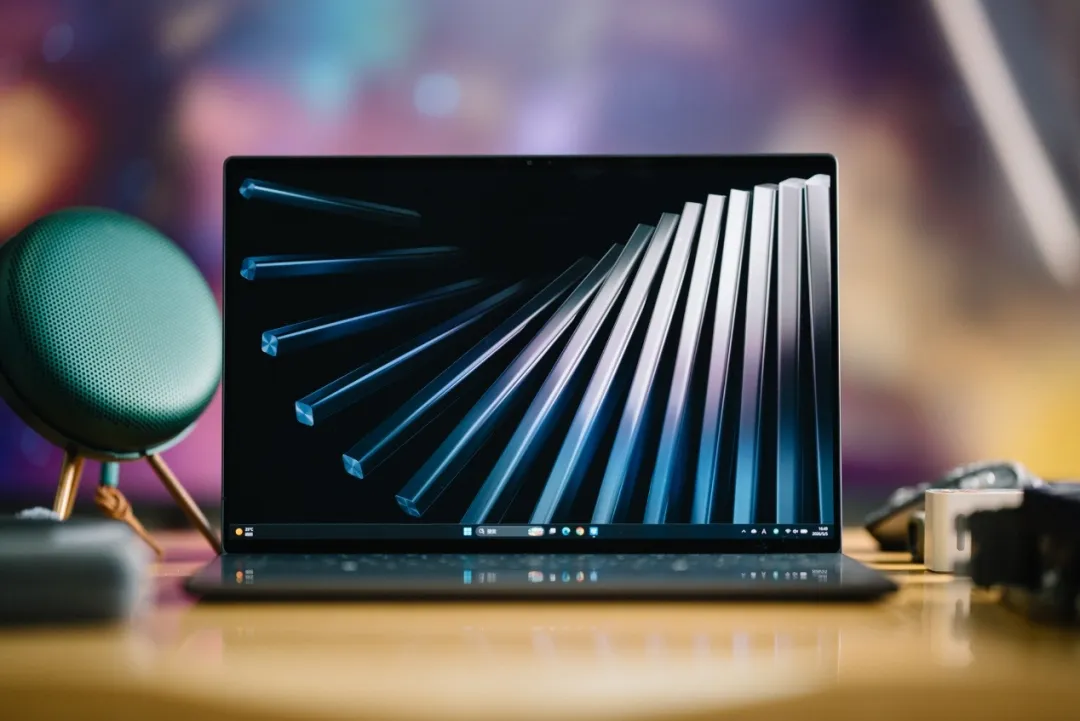
Few laptop families have maintained the same level of design consistency and premium appeal as Dell’s XPS lineup. For years, the series has represented the benchmark for high-end ultraportables, combining minimalist aesthetics, exceptional build quality, and a refined user experience that few competitors can match.
The latest XPS 14, unveiled alongside the XPS 16 at CES 2026, continues that legacy while introducing one of the most significant platform upgrades in the product’s history. Featuring a completely redesigned chassis, Intel’s next-generation Panther Lake processor, a stunning Tandem OLED display, and remarkable battery life, the new XPS 14 positions itself as one of the most compelling premium laptops available today.
The question is simple: does this redesign elevate the XPS 14 into the next-generation dream laptop?
🎨 Industrial Design Reaches a New Level #
The new XPS 14 embraces an even cleaner industrial design language than its predecessor.
Rather than relying on visual tricks to appear thinner, Dell has adopted a flatter profile with gently rounded corners that create a more modern and sophisticated appearance. The result is a laptop that feels both contemporary and timeless.
Machined from a single block of aluminum using CNC manufacturing techniques, the chassis delivers exceptional rigidity while maintaining an impressively slim footprint:
- Thickness: 14.62 mm
- Weight: 1.36 kg
- Material: CNC-machined aluminum
- Finish: Graphite metallic coating
The seamless integration of the sidewalls and base creates an elegant unibody appearance that feels remarkably solid in hand.
Adding to the minimalist aesthetic, Dell has replaced the traditional circular Dell logo on the lid with a clean XPS wordmark centered on the top cover. The Dell branding itself has been moved to the underside of the device, reinforcing the understated premium identity that has become synonymous with the XPS family.
🛠️ Build Quality That Defines the XPS Brand #
Attention to detail remains one of the strongest aspects of the XPS 14.
Every surface feels carefully engineered:
- Smooth CNC aluminum construction
- Finely sandblasted texture
- Rounded corner transitions
- Clean, uninterrupted panel surfaces
The lid opens effortlessly with one hand thanks to a redesigned hinge mechanism that provides carefully tuned resistance throughout its range of motion.
Dell has also integrated the primary exhaust system into the hinge area, allowing hot air to exit cleanly through the rear of the chassis without disrupting the user experience.
Under sustained load, thermal testing reveals an intelligent heat distribution strategy:
- Maximum surface temperature: 45.8°C
- Heat concentrated near the display hinge
- Keyboard area remains cool during operation
Equally impressive is the acoustic profile. Even at maximum fan speed, the cooling system produces approximately 47 dBA, maintaining a smooth and unobtrusive sound signature rather than the high-pitched fan noise often found in thin laptops.
For everyday productivity workloads, fan noise is barely noticeable.
🖥️ Tandem OLED Delivers a Spectacular Visual Experience #
Opening the lid reveals one of the highlights of the entire system: Dell’s InfinityEdge display.
The XPS 14 features a 2.8K Tandem OLED panel protected by Corning Gorilla Glass and equipped with full touch functionality.
Display Highlights #
- 2.8K resolution
- Tandem OLED technology
- Touchscreen support
- Corning Gorilla Glass protection
- InfinityEdge thin-bezel design
- HDR-capable 8MP webcam
- Infrared camera for Windows Hello
The use of Tandem OLED technology provides several advantages:
- Higher brightness potential
- Improved power efficiency
- Exceptional contrast ratios
- Perfect black levels
- Rich color reproduction
Color accuracy is equally impressive.
Testing with a Spyder Pro colorimeter produced:
| Metric | Result |
|---|---|
| DCI-P3 Coverage | 100% |
| Average Delta E | 0.62 |
These results place the display among the best available in the premium ultraportable segment and make it particularly attractive for photographers, designers, and content creators.
⌨️ A Refined Glass Palm Rest and Borderless Keyboard #
Perhaps the most distinctive feature of the XPS 14 remains its keyboard deck.
The entire palm rest surface is constructed from Corning Gorilla Glass 3, creating a seamless appearance that contrasts beautifully against the aluminum chassis.
The touchpad is fully integrated into this glass surface, eliminating visible boundaries and creating the illusion of a single continuous panel.
Dell has addressed usability concerns associated with invisible touchpads by introducing subtle tactile markers along the edges of the active touch area. These microscopic ridges remain virtually invisible while providing clear tactile feedback during navigation.
Zero-Lattice Keyboard Returns #
The signature Zero-Lattice keyboard remains a defining XPS characteristic.
Unlike conventional keyboards with visible gaps between keycaps, the keys are tightly arranged in a borderless layout that appears embedded directly into the glass deck.
Dell has also abandoned the controversial capacitive function row, replacing it with physical half-height function keys, including a dedicated ESC key.
Benefits include:
- Improved tactile feedback
- Better reliability
- Easier shortcut access
- Enhanced usability for developers and power users
After a short adjustment period, the typing experience proves responsive, precise, and highly satisfying.
🔊 Smart Audio and Connectivity Design #
Dell has cleverly concealed the speaker system within the chassis.
The audio configuration uses:
- Upward-firing tweeters
- Downward-firing woofers
- Hidden speaker grilles
This preserves the clean aesthetic while delivering surprisingly strong audio performance.
Connectivity remains intentionally minimalist but highly capable.
Ports #
Left Side:
- 2 × Thunderbolt 4 USB-C
Right Side:
- 1 × Thunderbolt 4 USB-C
- 3.5 mm audio jack
All USB-C ports support:
- Thunderbolt 4
- USB Power Delivery
- DisplayPort 2.1
Unlike many laptops where only select ports offer full functionality, every USB-C port on the XPS 14 provides identical capabilities.
🔋 Excellent Battery Life and Fast Charging #
The XPS 14 ships with a compact 100W USB-C charger weighing approximately 300 grams.
Combined travel weight remains under 1.7 kg.
Charging performance is excellent:
| Charge Level | Time |
|---|---|
| 0% → 50% | ~35 minutes |
| 0% → 100% | ~70 minutes |
Because the system supports charging from as little as 45W USB-PD sources, users can also utilize smartphone chargers and compact GaN adapters while traveling.
Battery life is equally impressive.
Battery Results #
- Video playback: 20+ hours
- PCMark 10 Modern Office: 18 hours
For a high-performance OLED ultraportable, these figures are exceptional.
⚡ Panther Lake Brings Major Performance Gains #
The heart of the XPS 14 is Intel’s new Panther Lake platform.
Our review configuration features the Core Ultra X7 358H processor.
Core Ultra X7 358H Configuration #
| Component | Specification |
|---|---|
| P-Cores | 4 Cougar Cove |
| E-Cores | 8 Darkmont |
| LP-E Cores | 4 Darkmont LP-E |
| Total Cores | 16 |
| Threads | 16 |
| Max Frequency | 4.8 GHz |
Panther Lake introduces several significant architectural improvements.
Cougar Cove P-Cores #
Compared to the previous generation:
- Improved branch prediction
- Enhanced memory disambiguation
- Larger TLB structures
- Approximately 10% higher single-thread performance
Darkmont E-Cores #
The redesigned efficiency cores feature:
- 9-wide instruction decode
- 416-entry out-of-order window
- 26 dispatch ports
- Shared 4 MB L2 cache per cluster
Intel claims multi-thread performance improvements of up to 50%.
LP-E Efficiency Island #
The low-power island allows background tasks to execute independently from the main compute tiles.
Benefits include:
- Lower idle power consumption
- Improved battery life
- More efficient background processing
Panther Lake also marks Intel’s first large-scale deployment of its Intel 18A process node combined with Foveros-S advanced packaging technology.
📊 Benchmark Performance #
Despite Dell prioritizing quiet operation and battery efficiency, the XPS 14 delivers outstanding performance.
CPU Performance Highlights #
3DMark CPU Profile #
- Single-thread improvement: 5%
- Multi-thread improvement: 70%+
Cinebench R24 #
- Multi-core performance increase: approximately 30%
Geekbench 6 #
- Single-core improvement: 2%
- Multi-core improvement: 45%+
V-Ray Benchmark #
- Performance increase exceeding 130%
System Performance #
PCMark 10 Extended #
- Overall improvement: 25%
CrossMark #
- Overall improvement: 15%
- Creativity workload improvement: 23%
These results demonstrate that Panther Lake is not simply an efficiency-focused evolution but a substantial leap in overall computing capability.
🎮 Intel Arc B390 Redefines Integrated Graphics #
The XPS 14 also benefits from Intel’s most powerful integrated graphics architecture to date.
Intel Arc B390 Specifications #
- Xe3-LPG Celestial architecture
- 12 Xe3 Cores
- 12 Ray Tracing Units
- Expanded L1 and L2 cache
- XeSS 3 support
- Multi-frame generation
Intel claims more than a 50% performance improvement over the previous-generation Xe2 architecture at similar power levels.
Graphics Benchmark Results #
Across multiple 3DMark workloads:
- Peak improvement: 84%
- Average improvement: 71%+
This transforms the XPS 14 from a productivity-focused ultrabook into a genuinely capable gaming machine.
For example:
- Forza Horizon 6: approximately 70 FPS at 1080p with XeSS enabled
- Many modern games approach or exceed 100 FPS under optimized settings
Considering Dell’s conservative thermal tuning, these results are particularly impressive.
🤖 AI and Content Creation Performance #
The Arc B390 also unlocks substantial gains for AI workloads.
A particularly useful feature is Intel Graphics Software’s memory allocation capability.
Users can allocate up to 87% of system memory to the GPU.
With 32 GB installed:
- Up to 27.5 GB available as graphics memory
This dramatically improves support for large AI models and GPU-intensive workloads.
UL Procyon Results #
Video Editing #
- 37% faster processing
Photo Editing #
- 8% improvement
Stable Diffusion #
- More than 60% reduction in image generation time
Local LLM Performance #
| Model | Tokens/sec |
|---|---|
| Phi-3.5 Mini (3.8B) | 44.35 |
| Mistral-7B | 27.04 |
| Llama 3.1 8B | 25.82 |
| Llama 2 13B | 14.74 |
Perhaps most impressively, the XPS 14 can successfully execute 13B-parameter models that typically exceed the memory limits of conventional ultraportables.
This makes the system a surprisingly capable mobile AI workstation.
🏆 Verdict: A Beautiful Laptop with Serious Performance #
The redesigned Dell XPS 14 successfully combines world-class industrial design with one of the most significant platform upgrades in recent XPS history.
Its strengths are numerous:
- Exceptional CNC-machined build quality
- Outstanding Tandem OLED display
- Nearly silent operation
- Outstanding battery life
- Powerful Panther Lake performance
- Industry-leading integrated graphics
- Strong local AI capabilities
Most importantly, Dell has managed to improve performance dramatically without sacrificing the characteristics that made the XPS series famous in the first place.
Whether editing videos, running local AI models, developing software, enjoying AAA games, or simply carrying it between meetings, the XPS 14 feels remarkably complete.
For users seeking a premium ultraportable that combines elegance, endurance, and next-generation computing performance, the Dell XPS 14 stands among the most impressive laptops of 2026.