ASRock Radeon AI Pro R9700 Review: 32GB GPU, 4x DisplayPort
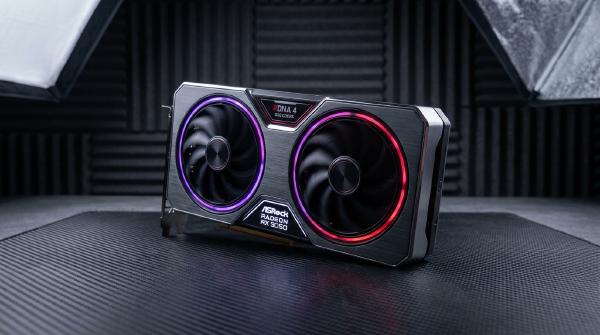
The ASRock Creator Radeon AI Pro R9700 is a workstation graphics card designed for local AI inference, model development, and professional visualization. Based on AMD’s RDNA 4 architecture and Navi 48 GPU, it combines 32GB of GDDR6 memory with dedicated AI acceleration, workstation-oriented cooling, and a compact dual-slot design.
Its most distinctive feature is not simply its compute throughput. The card is designed around the practical requirements of dense workstation configurations, including a blower cooler, a rear-mounted 12V-2x6 power connector, memory distributed across both sides of the PCB, and four DisplayPort 2.1a outputs without an HDMI port.
These choices reflect a change in workstation GPU priorities. As local large language models (LLMs), generative image workflows, and other AI applications require more dedicated video memory, system builders increasingly need to balance VRAM capacity, thermal management, PCIe slot occupancy, and software compatibility.
The R9700 targets this segment with 32GB of VRAM, 640GB/s of memory bandwidth, and support for AMD’s ROCm software ecosystem. Its workstation form factor also makes it suitable for multi-GPU configurations, provided the chassis, motherboard, power supply, and cooling system can accommodate the combined load.
The following analysis examines the card’s architecture, memory system, cooling design, display connectivity, and suitability for local AI computing.
🧠 1. Architecture and Compute Performance #
The Radeon AI Pro R9700 uses AMD’s Navi 48 GPU, based on the RDNA 4 architecture. Although the same GPU family also powers consumer Radeon graphics cards, the professional R9700 configuration emphasizes higher memory capacity and workstation deployment.
Core specifications #
| Specification | ASRock Creator Radeon AI Pro R9700 |
|---|---|
| GPU architecture | AMD RDNA 4 |
| GPU | Navi 48 |
| Compute units | 64 |
| Stream processors | 4,096 |
| AI accelerators | 128 |
| Ray accelerators | 64 |
| Boost clock | Up to 2.92GHz |
| Peak FP32 vector performance | 47.8 TFLOPS |
| Peak FP16 matrix performance | 191 TFLOPS |
| Peak FP8 matrix performance | Approximately 382.7 TFLOPS |
| Dedicated memory | 32GB GDDR6 |
| Memory interface | 256-bit |
| Memory bandwidth | 640GB/s |
| Infinity Cache | 64MB |
| PCIe interface | PCIe 5.0 x16 |
| Total board power | 300W |
| Power connector | 12V-2x6 |
| Display outputs | 4 × DisplayPort 2.1a |
| Form factor | Active cooling, dual-slot |
The specifications are based on AMD’s published figures and ServeTheHome’s examination of the ASRock Creator model. Actual operating frequency and sustained performance depend on workload, temperature, power management, and the software stack.
How RDNA 4 handles matrix computation #
One architectural distinction separates the R9700 from AMD’s server-oriented CDNA accelerators.
Rather than relying on a separate collection of matrix cores like those found in AMD’s CDNA architecture, RDNA 4 integrates matrix-operation capabilities into its compute units through Wave Matrix Multiply-Accumulate (WMMA) instructions.
This allows the same general GPU compute architecture to support graphics, general-purpose parallel execution, and neural-network matrix operations.
The R9700 adds hardware support for FP8 matrix computation, a format commonly used to reduce the storage and bandwidth requirements of AI workloads.
Its advertised peak FP8 matrix throughput is approximately 382.7 TFLOPS for dense operations, with theoretical throughput reaching approximately twice that figure under supported structured-sparsity conditions.
These figures represent peak hardware capabilities, not guaranteed application performance. Real-world results depend on the numerical format, model architecture, software implementation, and whether the workload can take advantage of the relevant sparsity and acceleration paths.
FP6 and FP4 workload considerations #
The card can also support software workflows using lower-precision formats such as FP6 and FP4, but those formats do not receive the same dedicated execution-rate advantage as native FP8 operations.
In the implementation described by ServeTheHome, lower-precision weights can be used within an FP8-oriented execution path rather than benefiting from a separate, faster FP6 or FP4 hardware path.
The distinction matters for model deployment. Lower-precision weights can reduce memory consumption, allowing more model parameters to fit into VRAM, but they do not automatically increase compute throughput proportionally.
For AI developers, the important question is whether the selected framework supports the required representation efficiently and whether its quantization method preserves acceptable model quality.
💾 2. 32GB VRAM: The Main Advantage for Local AI #
Memory capacity is one of the R9700’s strongest selling points.
The card uses 32GB of GDDR6 across a 256-bit memory interface, with a memory data rate of 20Gbps and peak bandwidth of 640GB/s. It also includes 64MB of AMD Infinity Cache.
These resources are particularly useful for AI workloads that are limited by model size or memory traffic.
Memory configuration and bandwidth #
The 32GB memory configuration uses 16 memory devices arranged in a clamshell layout, with memory chips distributed across both sides of the PCB.
This arrangement allows the card to provide more dedicated memory than the 16GB configuration commonly found on consumer Radeon cards using the same general GPU family.
The 640GB/s bandwidth supports movement of model weights, activations, and other intermediate data between VRAM and the compute units.
However, bandwidth and capacity solve different problems. Capacity determines how much data can remain resident in VRAM, while bandwidth determines how quickly that data can be transferred.
A model that does not fit in VRAM may require quantization, CPU offloading, or multi-GPU partitioning even if the card has substantial compute performance.
What model sizes fit into 32GB? #
The relationship between parameter count and memory capacity depends heavily on numerical precision.
A model with 30 billion parameters requires approximately 60GB for its weights alone when stored at 16-bit precision. This exceeds the R9700’s 32GB capacity before allocating memory for the runtime or KV cache.
At approximately six bits per parameter, the theoretical weight storage falls to around 22.5GB for 30 billion parameters, excluding quantization metadata and other overhead.
That makes certain quantized 30B-class models feasible on a 32GB card, although the actual memory footprint must also account for:
- Model metadata and quantization scales.
- Runtime allocations and intermediate tensors.
- KV-cache storage for the active context.
- Temporary buffers required by the inference engine.
- Additional memory consumed by the operating system and display workload.
Consequently, a 30B-class model may fit under suitable quantization and context settings, but compatibility and remaining memory headroom must be verified for the specific model.
The same principle applies to diffusion models. Large models and high-resolution image-generation workflows can consume substantial VRAM, making a 32GB configuration more flexible than a 16GB GPU.
A professional alternative to larger accelerators #
The R9700 is not a replacement for every data-center accelerator. It has less memory capacity than some professional GPUs and lacks the same system-level interconnect and deployment characteristics as certain server-oriented products.
Its appeal lies in making substantial local AI capacity available within a conventional workstation form factor.
For developers and researchers who want to run models locally, test quantization strategies, or build inference applications without depending entirely on cloud services, 32GB can be a practical capacity target.
For further background on the card’s position in AMD’s professional portfolio, see KAD’s analysis of the Radeon AI Pro R9700 and its 32GB local AI configuration.
🛡️ 3. Soft ECC and Workstation Reliability #
The R9700 includes a workstation-oriented reliability feature: soft error-correcting code (ECC) support.
ServeTheHome reports that this functionality is available under Linux and must be enabled manually.
What soft ECC provides #
Soft ECC uses software and memory-management mechanisms to detect or correct supported classes of memory errors, depending on the implementation.
This is distinct from conventional hardware ECC memory with dedicated error-correction bits and controller support.
The feature can provide an additional reliability measure for supported workloads, particularly in systems that execute long-running inference jobs or operate multiple GPUs for extended periods.
However, soft ECC should not be treated as equivalent to full hardware ECC across the entire memory subsystem. Its effectiveness and coverage depend on the implementation, supported memory operations, driver configuration, and software stack.
Why reliability matters for multi-GPU systems #
A workstation with multiple GPUs increases the amount of hardware involved in a computation and creates additional opportunities for device errors, thermal problems, and power-related instability.
For long-running jobs, reliability mechanisms become valuable alongside monitoring, workload recovery, checkpointing, and system-level validation.
Before deploying the R9700 in a production workstation, administrators should verify the ECC feature’s status on the selected Linux configuration and ensure that the relevant driver and ROCm versions support the intended operating mode.
🧊 4. Dual-Slot Blower Cooling and Multi-GPU Design #
The ASRock Creator version follows a conventional workstation design priority: preserve PCIe slot compatibility and direct hot air toward the rear of the chassis.
Its active dual-slot blower cooler distinguishes it from many open-air consumer graphics cards.
Compact mechanical design #
ServeTheHome measures the card at approximately 271 × 111 × 39mm, while ASRock’s product documentation specifies a compact dual-slot form factor.
The chassis-compatible width and height are intended to make it easier to install multiple cards in a workstation.
ASRock’s design uses a single radial blower that draws air through the cooler and directs exhaust through the PCIe bracket.
This is especially useful in multi-GPU configurations, where an open-air cooler can recirculate heat from one card into the intake of a neighboring card.
Blower cooling instead encourages a more controlled airflow path through the chassis, although overall thermal performance still depends on the case design and available intake air.
Vapor chamber and PTM7950 thermal interface #
The card uses a vapor chamber that directly contacts the GPU die and transfers heat to the heatsink.
ASRock also specifies Honeywell PTM7950 phase-change thermal interface material between the GPU and cooler.
The combination is intended to transfer heat efficiently under the card’s 300W total board power.
Because the memory devices are arranged on both sides of the PCB, the card also includes a metal backplate with corresponding thermal pads and ventilation features.
This is an important detail for a 32GB design. Cooling the GPU die alone is insufficient if the memory devices also operate under sustained high utilization.
Rear-mounted 12V-2x6 power connector #
A distinctive feature of the ASRock Creator model is its rear-mounted 12V-2x6 power connector.
The connector is rated for up to 600W, substantially higher than the card’s 300W total board power.
The higher connector rating provides electrical capacity headroom; it does not mean that the card consumes 600W during normal operation.
Placing the connector at the rear of the card helps avoid the clearance problems associated with power cables emerging from the top of a tightly packed multi-GPU installation.
This can simplify routing when several cards are installed next to one another, although builders must still follow the cable manufacturer’s bending and clearance requirements.
Four-GPU workstation configurations #
ServeTheHome notes that up to four R9700 cards can fit in a standard ATX workstation configuration when the chassis, motherboard, and slot layout support the arrangement.
At four cards, the nominal GPU board-power total is approximately 1,200W, before accounting for the CPU, motherboard, storage, cooling, and other components.
Consequently, mechanical fit is only one part of the system design.
A practical four-GPU build must also consider:
- Power-supply capacity and the available power connectors.
- Motherboard slot spacing and PCIe lane configuration.
- Chassis airflow and exhaust capacity.
- GPU operating temperatures under sustained load.
- Whether the selected AI software can distribute work across all four cards.
The blower design and dual-slot profile make the R9700 easier to integrate into a dense workstation, but they do not eliminate these system-level requirements.
🖥️ 5. Four DisplayPort Outputs and No HDMI #
The ASRock Creator Radeon AI Pro R9700 differs from many other partner variants through its display-output configuration.
Instead of combining DisplayPort and HDMI, ASRock equips this model with four DisplayPort 2.1a outputs.
This makes it a distinctive choice for professional users who operate several high-resolution monitors or work in display-intensive environments.
DisplayPort 2.1a and DSC #
The four DisplayPort 2.1a outputs support modern high-bandwidth display configurations.
With Display Stream Compression (DSC), the card can support display modes up to 12K under the appropriate monitor, timing, and link configuration.
DSC is a visually lossless compression technology designed to reduce the data rate required to transmit high-resolution display signals.
The maximum resolution should not be interpreted as a guarantee that every monitor can run at 12K with any combination of refresh rate and color depth. Actual support depends on the display, link bandwidth, DSC support, and connection settings.
Why omit HDMI? #
For a workstation card, an all-DisplayPort layout can make sense.
DisplayPort is widely used by professional monitors and multi-display workstation environments. Four native DP outputs can simplify direct connection to multiple compatible displays without relying on adapters to convert one of the outputs from HDMI.
However, HDMI remains important for televisions, AV receivers, capture equipment, and monitors that do not provide DisplayPort inputs.
Users who require HDMI connectivity may need an active or passive adapter, depending on the display requirements and supported conversion path.
The all-DP configuration is therefore a clear design preference rather than a universally superior output layout.
The choice is also specific to this ASRock model. Other Radeon AI Pro R9700 partner cards can offer different output configurations, so buyers should verify the exact board specification before purchasing.
For reference, see the official ASRock Creator Radeon AI Pro R9700 specifications.
⚙️ 6. ROCm and the Local AI Software Stack #
The R9700’s hardware capabilities are only useful when the software stack can access them efficiently.
AMD’s ROCm ecosystem provides the libraries and runtime components used by supported machine-learning frameworks and AI applications on AMD GPUs.
Local inference and development workflows #
Potential workloads include:
- Local LLM inference through compatible inference engines.
- Diffusion-based image generation.
- Selected fine-tuning and training workloads.
- Computer vision and image-processing pipelines.
- AI-assisted creative applications.
The GPU’s 32GB VRAM capacity can be especially useful for local experimentation because it allows larger models to remain in dedicated memory than many mainstream consumer cards can accommodate.
However, compatibility varies by ROCm version, operating system, model architecture, and framework.
Developers should verify whether their preferred framework supports the R9700, whether the required operators are optimized for RDNA 4, and whether the software supports the desired precision formats.
Performance depends on the complete implementation #
A GPU’s peak TFLOPS or TOPS rating is not a reliable predictor of application latency by itself.
For an LLM, the relevant metrics may include prompt-prefill throughput, time to first token, sustained tokens per second, and memory consumption.
For image generation, performance depends on model size, image resolution, sampler, number of steps, precision, and backend optimization.
The most meaningful evaluation therefore benchmarks the actual workload and runtime rather than comparing theoretical arithmetic throughput alone.
🎯 7. Who Should Consider the ASRock Creator R9700? #
The R9700 is best suited to users who need a combination of large VRAM capacity, professional workstation integration, and local AI acceleration.
AI developers and researchers #
The 32GB memory configuration makes it useful for experimenting with larger quantized LLMs, diffusion models, and other memory-intensive workloads.
Local execution can reduce dependence on remote inference APIs and provide more control over development environments and sensitive test data.
Workstation builders #
The dual-slot blower cooler and rear-mounted power connector make the card attractive for multi-GPU configurations where physical clearance and predictable airflow matter.
These features can simplify system design, although the complete workstation still needs suitable power delivery, PCIe connectivity, and cooling.
Professional visualization users #
Four DisplayPort 2.1a outputs provide native support for multi-monitor environments. The card also retains the graphics capabilities expected of a workstation GPU, alongside its AI compute functions.
Users who depend on HDMI-only monitors or AV equipment should factor in the need for adapters.
Buyers who should evaluate alternatives #
The R9700 may not be the best choice for every deployment.
Users who require maximum software compatibility with a CUDA-dependent application may prefer an NVIDIA GPU. Users who need more than 32GB of memory on a single accelerator may need to consider higher-capacity professional or data-center products.
Similarly, workloads with limited memory requirements and a stronger focus on gaming may be better served by a consumer-oriented GPU with a different balance of performance, power, and price.
The decision should be based on the actual workload, software compatibility, and system configuration rather than the workstation label alone.
🌌 Conclusion: A Workstation GPU Designed Around Memory and Density #
The ASRock Creator Radeon AI Pro R9700 combines AMD’s RDNA 4 architecture with 32GB of GDDR6 memory, dedicated matrix acceleration, and a workstation-focused physical design.
Its 640GB/s memory bandwidth and 32GB VRAM capacity are particularly relevant to local AI inference, where model weights and intermediate data can exceed the practical memory limits of mainstream consumer GPUs.
The card’s dual-slot blower cooler, vapor chamber, PTM7950 thermal interface, backplate cooling, and rear-mounted 12V-2x6 connector make it suitable for carefully designed multi-GPU workstations.
Its four DisplayPort 2.1a outputs are another notable feature, although the absence of HDMI may require adapters in some professional environments.
The main qualifications are software compatibility and real-world performance. RDNA 4 matrix acceleration and ROCm provide a capable foundation, but actual results depend on supported workloads, runtime optimization, memory usage, and system configuration.
For developers and creators who need substantial local GPU memory without moving immediately to data-center-class hardware, the R9700 is a compelling workstation-oriented option. Its defining advantage is the combination of memory capacity, compact multi-card design, and support for professional graphics alongside AI computing.