Dell Pro Precision 5 16 Review: A Business Laptop with Workstation Power
The return of the Dell Pro Precision brand will feel familiar to anyone who has followed professional workstations for years. First introduced in 1997, Precision has spent nearly three decades establishing itself as a leading name in ISV-certified professional workstations, covering both desktop towers and mobile systems.
The Dell Pro Precision 5 16 Mobile Workstation carries that professional DNA while taking a noticeably more modern approach. It combines ISV certification, optional RTX PRO graphics, a serviceable design, Intel’s third-generation Core Ultra processors, and enterprise-oriented features in a chassis that looks more like a premium business laptop than a traditional workstation.
With all processors supporting Intel vPro and the NPU reaching up to 50 TOPS across the platform, the Dell Pro Precision 5 16 also arrives at a time when AI PCs and agent-oriented computing are becoming increasingly important. The question is whether a mainstream mobile workstation can deliver professional performance without sacrificing portability.
The Dell Pro Precision 5 16 provides an interesting answer.
💼 Business-Laptop Design, Workstation-Class Foundation #
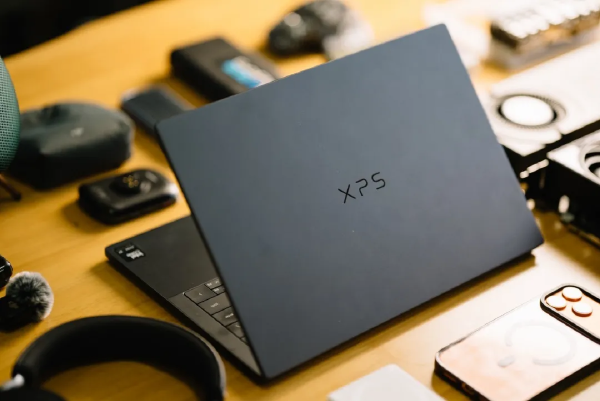
The most distinctive aspect of the Dell Pro Precision 5 16 is its decision to move away from the boxy appearance traditionally associated with mobile workstations. Instead, it uses an aluminum chassis with a slim, understated design.
The lid features clean lines, a restrained metallic finish, and the familiar DELL logo at the center. The dark-gray finish gives the machine a professional appearance while the matte surface does a good job of resisting fingerprints.
In everyday use, the Dell Pro Precision 5 16 feels considerably less bulky than traditional Precision workstations. It would fit naturally in a conference room, customer site, office, or even a coffee shop without looking out of place.
The chassis measures approximately 358.3 × 256.0 mm, with a thickness ranging from 13.78 mm at the front to 18.36 mm at the rear. Starting at approximately 2.16 kg, it is not an ultralight notebook, but that is a reasonable compromise for a 16-inch mobile workstation.
It is worth remembering that this is a workstation rather than a large-screen ultraportable or gaming laptop. Reliability, expansion, sustained performance, and serviceability take priority over extreme thinness. Within that framework, Dell has done a good job balancing mobility with workstation requirements.
The display hinge is stable, although opening the machine with two hands feels more natural. Once open, the hinge keeps the panel steady and allows the display to fold back as far as 180 degrees, providing additional flexibility in different working environments.
🖥️ 16:10 Display and Professional Ergonomics #
The Dell Pro Precision 5 16 uses a 16:10 aspect ratio, providing additional vertical space for documents, spreadsheets, coding windows, and professional applications.
Display options range from FHD+ to QHD+, while the FHD+ configuration can also be equipped with touch support. The tested panel reached approximately 400 nits of brightness and provides sufficient color coverage for everyday business and professional workloads.
The display selection is also influenced by the workstation’s durability requirements. The machine is designed to meet demanding environmental testing requirements, making reliability a more important consideration than simply maximizing display specifications.
The webcam can be configured in several ways. One option is an FHD RGB camera with temporal noise reduction and a physical privacy shutter. Another combines an 8MP camera with an IR sensor, enabling presence detection and Windows Hello facial recognition.
Both configurations include a physical camera shutter, giving users a simple way to block the camera when privacy is required.
⌨️ Full-Size Keyboard and Extensive Connectivity #
The 16-inch chassis provides enough room for a full-size keyboard with a dedicated numeric keypad. Backlit and non-backlit configurations are available.
The large touchpad and spacious palm rest make the machine comfortable for extended office sessions. The power button can also be configured with an integrated fingerprint reader for Windows Hello authentication.
Connectivity is another area where the workstation clearly distinguishes itself from many thin business notebooks.
The left side provides two Thunderbolt 4 ports supporting up to 40Gbps, USB Power Delivery, and DisplayPort output. An HDMI 2.1 port is also available for external displays, projectors, and televisions.
The right side includes:
- RJ45 Gigabit Ethernet
- Two USB-A 3.2 Gen 1 ports
- 3.5mm audio
- MicroSD card slot
- Optional Nano-SIM connectivity for 5G WWAN
- Optional card-reader functionality for enterprise deployment
For professionals working with external displays, wired networks, storage devices, and specialized peripherals, this connectivity is far more practical than the minimalist port selection found on many consumer laptops.
🔧 Serviceability and Enterprise Reliability #
One of the Dell Pro Precision 5 16’s strongest long-term advantages is its serviceable construction.
Dell explicitly treats the bottom cover as a serviceable component. Once the screws are removed, IT technicians can access components such as memory, SSDs, and the battery.
The machine supports removable LPCAMM2 memory modules, while dual M.2 slots provide additional storage expansion. The battery can also be replaced.
For enterprise IT departments planning a three-to-five-year deployment cycle, this modular approach can significantly improve the system’s long-term value. Instead of replacing an entire workstation when a component becomes outdated or fails, selected components can be serviced or upgraded.
The machine also carries MIL-STD 810H testing credentials. Originally developed for military equipment, the standard evaluates devices under demanding environmental conditions and has subsequently become common in commercial computing.
The Dell Pro Precision 5 16 additionally carries EPEAT Gold Climate+ certification. EPEAT evaluates areas including energy efficiency, materials, repairability, and packaging, making the certification particularly relevant for corporate and government procurement.
The system also meets ENERGY STAR 9.0 and TCO 10 requirements. Its transportation packaging uses 100% recycled materials and is itself recyclable, while the notebook incorporates bio-based and recycled materials.
For large organizations with sustainability requirements built into procurement policies, these certifications can be as important as raw benchmark performance.
🚀 Core Ultra 300H Delivers Serious Performance #
The Dell Pro Precision 5 16 is available with both integrated graphics and professional RTX PRO discrete graphics.
The tested configuration uses an Intel Core Ultra 5 336H processor. Although it sits toward the entry level of the workstation lineup, its performance is surprisingly strong.
The processor features:
- 12 cores
- 12 threads
- 4 P-cores
- 4 E-cores
- 4 LP E-cores
- Up to 4.6GHz boost frequency
- Up to 65W Turbo power
- 18MB L3 cache
- Integrated NPU
- Xe3 integrated graphics
Higher-end configurations are available with the Core Ultra 7 366H and Core Ultra 9 386H, with the platform supporting Intel vPro throughout the range.
The Core Ultra 5 336H is built using Intel’s 18A process technology. Intel 18A introduces RibbonFET gate-all-around transistors and PowerVia backside power delivery. Intel claims that, compared with Intel 3, 18A can deliver up to 18% higher performance at the same power or up to 38% lower power at the same performance level.
The Compute Tile containing the CPU cores and NPU is manufactured using Intel 18A, while the Graphics Tile uses Intel 3 for the Xe3 graphics architecture. The platform controller tile is manufactured by TSMC using its N6 process.
The platform also supports Thunderbolt 4, Wi-Fi 7 R2, and Bluetooth 6.0, while providing 20 PCIe lanes for expansion.
🌡️ Sustained Performance Without Excessive Heat #
One of the more impressive aspects of the tested system is how well it handles sustained workloads.
Under stress testing, the chassis remained relatively cool, with the highest temperatures concentrated near the area below the display rather than around the keyboard or touchpad.
Fan noise is also well controlled. Even when the cooling system reaches high speeds, the acoustic profile remains relatively low-pitched and does not become particularly harsh or irritating.
This matters for a mobile workstation because professional workloads often run for extended periods. A system that can maintain performance without excessive heat or unpleasant acoustics is much more useful than one that delivers a high peak score for only a few minutes.
📊 CPU Benchmark Performance #
The Core Ultra 5 336H was tested using several industry-standard benchmarks, including Cinebench 2024 and Cinebench 2026.
The Dell Pro Precision 5 16 demonstrates strong CPU performance in both single-threaded and multi-threaded workloads. The system appears to make effective use of the processor’s available power budget rather than aggressively throttling under sustained workloads.
V-Ray Benchmark provides another useful perspective because it measures multi-core CPU path-tracing performance.
The tested system achieved approximately 15,965 vsamples, with all cores maintaining around 4.25GHz during the test. That puts the processor’s sustained rendering performance in the territory of a respectable mid-range desktop workstation.
In 3DMark CPU Profile, the system achieved approximately:
- Maximum threads: 8,121
- Single thread: 1,111
The relatively small gap between the 16-thread and maximum-thread results indicates that the processor is able to maintain substantial throughput under highly parallel workloads.
Geekbench 7 produced:
- Single-core: 2,426
- Multi-core: 14,408
These results translate into responsive everyday operation and strong parallel performance for office productivity, content creation, development, and other professional workloads.
🔋 Strong Battery Life and Portable Charging #
Performance is only half the equation for a mobile workstation. Battery life is equally important for professionals who regularly move between offices, customer sites, and meetings.
The tested system uses a 64Wh battery and achieved more than 10 hours in PCMark 10’s office workload. A larger 96Wh battery option can provide additional endurance.
The bundled 100W power adapter is also relatively compact for an OEM workstation charger. It supports Dell ExpressCharge, allowing the battery to charge from approximately 5% to full capacity in around one hour under suitable conditions.
For the integrated-graphics configuration, the 100W adapter provides ample power for normal operation.
🤖 NPU and Xe3 Graphics Bring AI to the Workstation #
The AI capabilities of the Core Ultra 5 336H are particularly relevant to the current generation of business workstations.
Its NPU provides approximately 47 TOPS, comfortably exceeding Microsoft’s 40-TOPS threshold commonly associated with Copilot+ PC-class AI capabilities.
The processor also includes four Xe3 graphics cores with ray-tracing support. While this is substantially less powerful than the 12-Xe3-core configurations available in higher-end Core Ultra X products, the integrated GPU remains impressive for a mainstream mobile workstation.
A major contributor is the system’s high-speed 8,533 MT/s LPCAMM2 LPDDR5X memory.
The tested memory configuration achieved approximately:
- Read: 105GB/s
- Write: 114GB/s
High memory bandwidth is especially valuable for integrated graphics because the GPU shares system memory with the CPU.
🎨 Xe3 Integrated Graphics Performance #
Geekbench 7 GPU Compute testing produced an OpenCL score of approximately 21,138.
That puts the Xe3 integrated GPU toward the stronger end of integrated graphics solutions and provides useful acceleration for general-purpose computing, image processing, light AI inference, and professional applications.
The GPU is capable of handling:
- Multi-monitor office workloads
- Lightweight 3D modeling previews
- Image processing
- Video editing
- Light AI inference
- Mainstream gaming
However, professionals working with heavy 3D rendering, large AI models, or demanding GPU-accelerated applications should select the optional RTX PRO discrete GPU.
🎬 Video and Photo Editing Performance #
UL Procyon provides a useful complement to synthetic graphics benchmarks because it evaluates real professional applications.
In the Procyon Video Editing Benchmark, the tested system completed:
- H.264 1080p export: approximately 147.9 seconds
- 4K export: approximately 240 seconds
Intel Quick Sync hardware encoding plays an important role here. Combined with the Xe3 GPU, it allows the system to handle light and moderate video-production workloads efficiently.
Photo editing performance is similarly strong for normal Photoshop and Lightroom work. However, GPU-intensive AI features, Enhance Details, and demanding GPU filters expose the limitations of an integrated GPU.
Professional photographers processing large batches of high-resolution images should therefore consider the RTX PRO configuration.
🧠 Local AI and Stable Diffusion #
The integrated GPU is also capable of running lightweight generative AI workloads locally.
In the UL Procyon Stable Diffusion 1.5 INT8 test using the OpenVINO engine, the system achieved approximately 3,116 points, generating a 512-resolution image in roughly 10 seconds with a UNET speed of approximately 5.107 iterations per second.
That is sufficient for generating concept images and lightweight AI experimentation while traveling.
Intel’s driver and memory-management optimizations can also allow the integrated GPU to access a substantial portion of system memory for workloads that require more memory than a conventional integrated graphics configuration would normally have available.
On the tested 16GB configuration, as much as approximately 74% of system memory could be allocated to GPU use under the relevant configuration.
This expands the range of AI applications that can realistically run on the integrated GPU, although it does not turn shared system memory into the equivalent of dedicated VRAM.
💬 Local LLM Performance #
The Dell Pro Precision 5 16 also performs well in lightweight local language-model workloads.
In UL Procyon AI Text Generation testing, the Core Ultra 5 336H achieved approximately:
| Model | Performance |
|---|---|
| Phi-3.5 | 30.77 tokens/s |
| Mistral 7B | 20.2 tokens/s |
| Llama 3.1 | 18.9 tokens/s |
First-token latency remained around one second.
This makes the system suitable for local document summarization, knowledge retrieval, coding assistance, and other lightweight AI tasks.
For users who need to work with AI models away from the cloud, the integrated NPU and GPU provide useful acceleration, while the CPU remains a reliable fallback and task-scheduling resource.
🧪 Geekbench AI Performance #
Geekbench AI evaluates machine-learning performance using workloads such as image classification, object detection, and machine translation across FP32, FP16, and INT8 precision levels.
Using the CPU and ONNX backend, the Core Ultra 5 336H achieved approximately:
- FP32: 4,297
- FP16: 1,907
- INT8: 7,834
The substantially stronger INT8 result highlights the benefit of integer-based inference optimization for lightweight quantized models.
CPU inference remains more suitable for smaller models and general-purpose fallback workloads, while the NPU and GPU are better positioned for specialized AI acceleration.
🖥️ Overall System Performance #
PCMark 10 Extended provides a broader assessment covering everyday productivity, digital content creation, and gaming-related workloads.
The Dell Pro Precision 5 16 achieved an overall score of approximately 7,277, including:
- Essentials: 10,998
- Productivity: 13,784
These results demonstrate that the machine has no difficulty handling common enterprise workloads such as document editing, web browsing, video conferencing, spreadsheets, and multitasking.
CrossMark also produced a strong overall result, reaching approximately twice its calibrated reference level.
Taken together, these benchmarks reinforce the same conclusion seen throughout testing: the Core Ultra 5 336H configuration is not merely an entry-level workstation option. It provides substantial everyday and professional computing performance while maintaining good efficiency.
🛡️ Intel vPro for Enterprise Management #
Another important feature is Intel vPro support.
vPro should not be thought of as a single processor feature. Instead, it represents a combination of processor, chipset, firmware, software, security, and management technologies designed to provide enterprise-grade remote management and hardware-assisted security.
For corporate IT departments, this can be more valuable than benchmark performance alone.
Administrators can benefit from capabilities such as remote management, hardware-level security functions, and improved platform stability across managed fleets.
For a workstation expected to remain in service for several years, enterprise manageability can significantly reduce the operational burden on IT teams.
🏢 A Workstation Designed for Long-Term Enterprise Use #
The Dell Pro Precision 5 16 ultimately succeeds because it does not try to look like a traditional workstation.
Its aluminum chassis, relatively restrained dimensions, and 2.16kg starting weight make it much easier to carry than many previous-generation mobile workstations.
At the same time, it retains the features that distinguish a professional system:
- ISV certification
- Optional RTX PRO graphics
- MIL-STD 810H testing
- Expandable LPCAMM2 memory
- Dual M.2 storage
- Replaceable battery
- Extensive I/O
- Intel vPro
- Enterprise security features
- Long-term serviceability
That combination gives the system a considerably broader range of potential deployments than a typical consumer notebook.
⚙️ Fully Configured, It Becomes a Serious Mobile Workstation #
The tested Core Ultra 5 336H configuration represents the entry point rather than the maximum capability of the platform.
A fully configured system can be equipped with:
- Core Ultra 9 386H
- Up to 64GB LPCAMM2 LPDDR5X-8533 memory
- RTX PRO 2000 graphics
- Touch display
- Up to 4TB SSD storage
- Larger battery options
- Fingerprint authentication
- Higher-end camera configurations
- Different keyboard configurations
- Different power-adapter options
This level of customization allows enterprises and professionals to configure the system around their actual workloads rather than purchasing a fixed consumer specification.
✨ Final Thoughts #
The Dell Pro Precision 5 16 makes a strong first impression because it successfully combines two seemingly contradictory characteristics: the appearance and portability of a premium business notebook with the expansion, reliability, security, and performance expected from a professional workstation.
The tested Core Ultra 5 336H is technically an entry-level processor for the platform, yet its performance is more than sufficient for enterprise productivity, development, moderate content creation, local AI workloads, and many professional applications.
The high-speed LPCAMM2 memory also gives the Xe3 integrated GPU enough bandwidth to perform well beyond what its specifications might initially suggest. For light AI inference, photo editing, video production, and multi-display productivity, the integrated configuration is surprisingly capable.
Users who need serious GPU compute, advanced 3D workloads, professional rendering, or heavy AI processing should step up to an RTX PRO configuration.
Ultimately, the Dell Pro Precision 5 16 is not a consumer laptop pretending to be a workstation. It is a genuine professional platform that simply happens to be packaged in a much more approachable form.
For engineers, consultants, designers, developers, and other professionals who frequently travel while carrying demanding workloads, that combination of portability, expandability, security, and workstation-class capability makes the Dell Pro Precision 5 16 a compelling business tool.
The remaining challenge may not be convincing yourself to buy one—it may be convincing your company’s IT department to approve the upgrade.