HP EliteBoard G1a Review: A Windows AI PC Built Into a Keyboard
At CES 2026, HP introduced the EliteBoard G1a, a keyboard-form-factor Windows AI PC that earned a CES 2026 Innovation Award. The concept sounds unusual, but the idea is straightforward: integrate an entire computer into a conventional-looking keyboard. The processor, memory, SSD, speakers, cooling system, connectivity, and battery are all housed inside a chassis with a thickness comparable to that of a regular desktop keyboard.
Why build a PC this way? Consider how many professionals actually use their laptops at work. They arrive at a desk, close the laptop lid, connect an external monitor and peripherals, and spend the day working on the larger screen. The built-in display and touchpad may go almost entirely unused.
The HP EliteBoard G1a takes that behavior to its logical conclusion. Instead of carrying a laptop display everywhere, you carry the keyboard-sized computer you actually need. Connect it to a compatible monitor, and your desktop environment is ready.
Keyboard computers are not entirely new. The Commodore 64 established the concept decades ago, while modern devices such as the Raspberry Pi 500 demonstrate that the form factor still has a place in computing. HP’s approach is different, however: the EliteBoard G1a targets professional Windows workflows, enterprise security, and AI PC functionality.
Can a computer without a built-in screen genuinely work as a mobile office machine? After several weeks of testing, the EliteBoard G1a makes a convincing case for a specific type of user: the professional who moves between offices, hot desks, home workspaces, and temporary workstations.
🪶 Design and Portability: A Complete PC in a Keyboard #
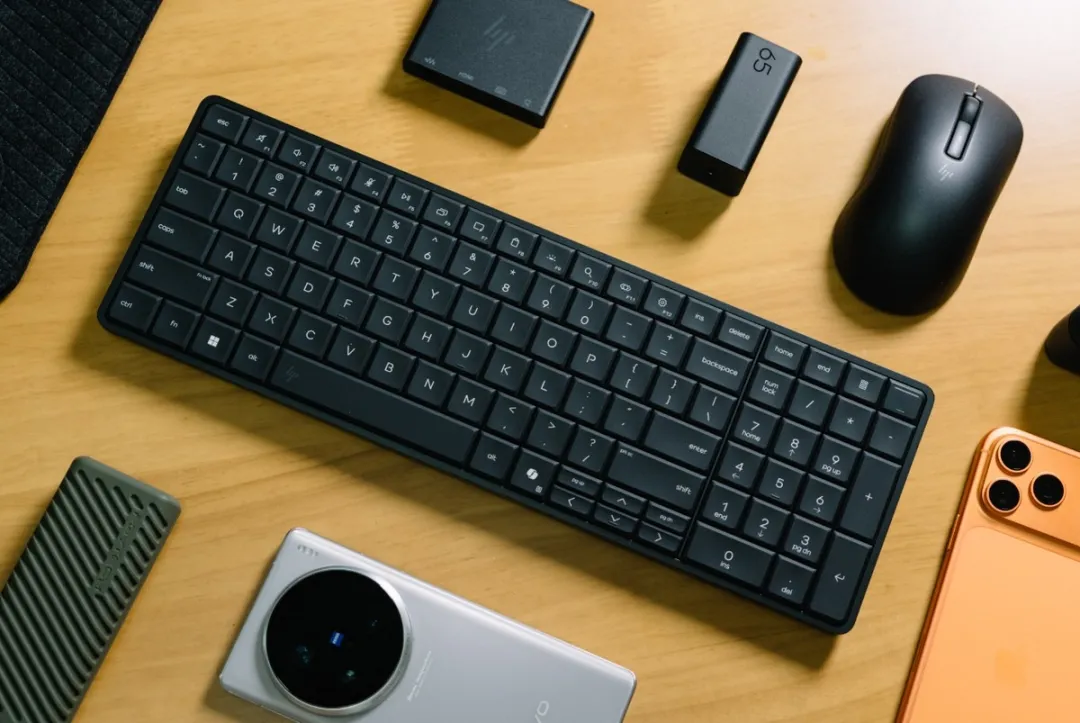
The first thing that stands out about the HP EliteBoard G1a is how difficult it is to distinguish from an ordinary keyboard. With a battery included, our review unit weighs just 768 grams. Its chassis measures 358 × 118 × 17 mm, giving it a slim, elongated profile that slides easily into a backpack.
Removing the screen, display hinge, and touchpad makes the portability advantage immediately obvious. Rather than carrying a conventional laptop, users can bring a compact computer that looks and feels like a wireless keyboard.
HP also includes a magnetic carrying sleeve with a plush interior lining. An additional rear pocket accommodates accessories such as cables, a power adapter, and a hub. It is a thoughtful inclusion for a product designed to move between workspaces.
Two USB-C configurations #
HP offers two hardware configurations that differ primarily in how the USB4 connection is implemented.
| Feature | Detachable-cable version | Integrated-cable version |
|---|---|---|
| USB-C connections | Two | Two additional expansion ports |
| USB4 connection | Detachable | Built-in fixed-security cable |
| Video output | DisplayPort over USB-C | DisplayPort over USB-C |
| Primary use case | Flexible cable arrangement | More secure, permanently attached connection |
The detachable-cable model reviewed here has two USB-C ports. One supports USB4 at up to 40 Gbps, 65W power input, and DisplayPort 2.1 output. The other supports USB-C 3.2 Gen 2 at up to 10 Gbps, with DisplayPort 1.4 output.
The integrated-cable version adds a fixed USB4 cable intended to reduce the risk of accidental disconnection or cable removal while retaining two additional USB-C ports for expansion.
Neither configuration includes native HDMI or Ethernet ports. That is a deliberate consequence of the compact design, but it means that choosing the right hub or dock is important.
The HDMI Multi Port Hub completes the setup #
HP’s optional HDMI Multi Port Hub addresses the EliteBoard G1a’s limited native connectivity. Its design differs from that of a conventional desktop USB-C hub: rather than sitting on the desk, it is intended to connect directly to a monitor’s HDMI port, with a longer USB-C cable running back to the keyboard.
This arrangement helps keep the desk tidy, with fewer loose cables beside the computer.
The hub provides two HDMI 2.1 outputs, two USB-C 3.2 Gen 2 ports, and an RJ45 Ethernet port supporting 1GbE wired networking. It can support dual-4K display setups, subject to the display modes and refresh rates supported by the connected displays.
There is one important setup detail. To power the EliteBoard through this hub, the included 65W power adapter must be connected to the hub’s power-input arrangement, which then connects to the EliteBoard. The two USB-C ports also handle the necessary data and video connections.
HP supplies a compact 65W gallium nitride (GaN) adapter with a 2-meter cable. Its physical size is closer to that of many 45W adapters, making it easy to carry with the computer.
Users who already own a compatible Thunderbolt 4 or USB4 dock can generally use that instead, provided it supports the required power delivery, display outputs, and peripherals.
A portable workstation with a single cable #
The EliteBoard G1a’s internal battery opens up another interesting use case. Connect a compatible portable monitor over USB-C, and the computer can power and drive certain displays without a separate power supply.
That makes it possible to build a temporary workstation from just the keyboard computer and a compatible screen. Add a mouse, and the setup is ready for work in a hotel room, meeting space, or another temporary location.
Battery life depends heavily on the display and workload. During our testing, a 13-inch 4K portable monitor running at 120 Hz resulted in approximately four hours of runtime. With basic web browsing, document editing, and a less demanding display, runtime could exceed six hours and approach eight hours under favorable conditions.
HP’s official rating is around 3.5 hours, so lighter real-world workloads can last longer than the published figure. However, the EliteBoard G1a should not be treated as a substitute for a laptop with all-day battery life, particularly when driving a high-resolution, high-refresh-rate portable monitor.
⚙️ AMD Ryzen AI 300: Performance for Everyday Work #
The HP EliteBoard G1a is powered by AMD’s Ryzen AI 300-series processors. Configurations range up to the Ryzen AI 7 350 PRO, with support for up to 64GB of DDR5-5600 memory. Other processor options include the Ryzen AI 5 340 PRO and Ryzen AI 5 330.
The Ryzen AI 7 350 PRO and Ryzen AI 5 340 PRO support AMD Integrated Management Technology (AIM-T), an out-of-band management capability designed for enterprise IT environments. It gives administrators another option for managing and maintaining business PCs remotely.
Our review unit uses the entry-level Ryzen AI 5 330, paired with 16GB of DDR5-5600 memory and a 512GB PCIe 4.0 SSD.
Ryzen AI 5 330 specifications #
| Specification | HP EliteBoard G1a review unit |
|---|---|
| Processor | AMD Ryzen AI 5 330 |
| CPU architecture | Zen 5 and Zen 5c |
| CPU cores / threads | 4 cores / 8 threads |
| Maximum boost clock | Up to 4.5 GHz |
| L2 cache | 4 MB |
| L3 cache | 8 MB |
| Integrated graphics | Radeon 820M |
| GPU architecture | RDNA 3.5 |
| GPU compute units | 2 |
| NPU architecture | XDNA 2 |
| NPU performance | Up to 50 TOPS |
| Memory | 16GB DDR5-5600 |
| Storage | 512GB PCIe 4.0 SSD |
| Default processor TDP | 28W |
The Ryzen AI 5 330 belongs to AMD’s Krackan Point 2 family and is manufactured using TSMC’s 4nm process. Its four-core design combines one high-performance Zen 5 core with three energy-efficient Zen 5c cores, with simultaneous multithreading enabling eight logical threads.
A default TDP of 28W is a sensible fit for a computer built into a chassis only 17 mm thick. It provides enough processing capability for mainstream productivity while keeping power and thermal demands manageable.
CPU performance: Productivity first #
We evaluated the processor using a range of CPU benchmarks, including 3DMark CPU Profile, Cinebench 2024, Cinebench 2026, and Blender Benchmark.
3DMark CPU Profile examines performance across different thread counts, helping illustrate how a processor scales from lightly threaded tasks to workloads that use more of its available threads. The Ryzen AI 5 330 delivers solid foundational performance for its class, making it suitable for multitasking and general office work.
Cinebench 2024 uses rendering workloads derived from Cinema 4D to measure single-core and multi-core CPU performance. Cinebench 2026 increases the intensity of its multithreaded workloads, providing another way to examine processing capability under heavier loads. Our results indicate that the EliteBoard G1a can sustain respectable performance for a compact, low-power system.
Blender Benchmark provides a more demanding rendering test using the Monster, Junkshop, and Classroom scenes. Here, the EliteBoard’s results are consistent with an entry-level mobile processor rather than a workstation-class CPU.
That distinction is important. The EliteBoard G1a is designed to make office work portable, not to replace a high-performance desktop for lengthy rendering jobs, intensive simulation, or other sustained CPU-heavy workloads.
Integrated graphics: Enough for office displays #
The Ryzen AI 5 330 integrates Radeon 820M graphics based on AMD’s RDNA 3.5 architecture, with two compute units. This is a relatively small GPU configuration compared with the graphics resources available in higher-tier Ryzen AI 300 processors.
Nevertheless, the integrated GPU is sufficient for the device’s intended purpose. It handles everyday desktop rendering, video playback, routine multi-monitor use, and light graphics workloads. It can also run casual games, although demanding modern games are not a realistic target for this configuration.
The display outputs are another strength. Support for DisplayPort 2.1 and HDMI 2.1 across the relevant system connections gives the EliteBoard G1a flexibility when working with modern external monitors.
In short, the Radeon 820M is not a performance gaming GPU, but it is adequate for a compact office PC that spends most of its life driving productivity applications and external displays.
Everyday application performance #
We also tested the EliteBoard G1a with UL Procyon Video Editing and Photo Editing benchmarks, Geekbench, PCMark 10, and Crossmark.
The results point to a consistent conclusion: the review configuration is well suited to everyday productivity, light photo editing, and modest video processing. Geekbench’s workloads span tasks such as audio compression, speech recognition, subtitling, and game physics, offering a broader view of CPU performance than one rendering test alone.
In PCMark 10, the Ryzen AI 5 330 system scored 4,141 points. This is a useful indicator of its positioning as a general-purpose productivity computer rather than a high-end creative workstation.
For more substantial editing workflows, GPU-intensive effects, or professional 3D rendering, a system with a more powerful CPU and integrated or discrete GPU would be a better choice. The EliteBoard’s value lies in delivering practical performance inside a remarkably portable design.
🧠 The 50 TOPS NPU Makes It a Copilot+ PC #
Although the EliteBoard G1a’s CPU and integrated graphics focus on mainstream productivity, its NPU is more capable than the entry-level processor might suggest.
The Ryzen AI 5 330 integrates an XDNA 2 NPU rated at up to 50 TOPS. This is the same stated NPU performance level found in higher-tier processors within the Ryzen AI 300 family.
TOPS means trillions of operations per second. It is a measure of theoretical AI processing throughput, not a guarantee of how quickly any particular application will run. Actual performance depends on the model, precision, software implementation, and whether a supported workload can use the NPU.
Even so, a 50 TOPS NPU provides the hardware capability required for Microsoft’s Copilot+ PC platform, which sets a dedicated NPU threshold of 40 TOPS. Compatible Windows 11 AI features can therefore take advantage of local acceleration rather than relying exclusively on CPU or GPU processing.
For additional background on AMD’s approach to on-device AI hardware, see KAD’s overview of AMD NPU technology.
Local AI performance in testing #
We used UL Procyon’s Stable Diffusion 1.5 Light benchmark in FP16 mode to evaluate image-generation performance. The system completed the test at 85.38 seconds per image.
That result should be interpreted in the context of the workload and benchmark implementation, rather than as a universal prediction for every image-generation application. More demanding models, different software backends, and alternative precision settings can produce substantially different results.
Geekbench AI provides another perspective by testing AI workloads across the CPU, GPU, and NPU. Its suite includes tasks such as image classification, object detection, and machine translation, with results reported at FP32, FP16, and INT8 precision levels. In our testing, the Ryzen AI 5 330 performed particularly well in quantized workloads.
The wider point is that the EliteBoard G1a is not simply a small Windows PC with an AI label attached. Its dedicated NPU can accelerate supported AI tasks while leaving the CPU available for normal desktop work. How much that matters in practice depends on the applications an organization deploys.
🌡️ Cooling and Noise: Well Managed in a Thin Chassis #
Packing a processor, battery, speakers, storage, and cooling system into a 17 mm-thick keyboard presents a clear thermal challenge. HP addresses it with large air intakes on the underside and exhaust vents along the rear edge, above the function-key row.
During sustained stress testing, the keycaps became only mildly warm. The placement of the exhaust vents also helps direct hot air away from the user’s hands, preserving typing comfort during long sessions.
At maximum fan speed, noise reached approximately 48 dBA in our testing. The fan produces a relatively low-pitched sound rather than a sharp, distracting whine. It is audible in a silent room under heavy load, but those conditions are unlikely to represent typical office use.
Under ordinary workloads such as document editing, browsing, and routine multitasking, fan noise is considerably lower. The EliteBoard G1a therefore manages the thermal trade-off reasonably well for its form factor.
⌨️ Typing Experience: A Stronger Keyboard Than Most Laptops #
The absence of a display and trackpad might initially seem like a limitation, but it also allows HP to prioritize the component that users interact with most often: the keyboard.
The EliteBoard G1a provides approximately 2 mm of key travel, giving it a more substantial typing feel than many thin-and-light laptops. Its low-profile keycaps and silicone membrane design keep keystrokes quiet, making it appropriate for open-plan offices and shared workspaces where loud mechanical switches could become distracting.
Key feedback is crisp and controlled. In everyday typing, the experience is closer to that of a premium business laptop than a budget compact keyboard.
There are a few compromises. The arrow keys and Page Up/Page Down keys use half-height layouts, which can take some adjustment when navigating long documents or code. Users who depend heavily on those keys may need a short adaptation period.
Built-in fingerprint authentication #
The power button sits in the upper-right corner and integrates a fingerprint reader. With Windows Hello, users can authenticate quickly without entering a password every time they start working.
The process feels natural: connect the EliteBoard to a monitor or dock, press the power button, and sign in with a fingerprint. In shared office environments, biometric authentication also helps protect access to work documents when users move between desks.
Because this is a business-oriented system, HP also incorporates a broader set of security features.
Enterprise security features #
The EliteBoard G1a supports HP Wolf Security for Business protections, including features such as Sure Click, Sure Run, Sure Recover, Sure Sense, Tamper Lock, hardware TPM 2.0, and Microsoft Pluton. The platform also includes an HP Endpoint Security Controller and a Nano security lock slot.
The AMD Ryzen AI 5 330 configuration does not include AIM-T, which is reserved for the supported higher-tier processor options. However, that does not prevent it from using the supported HP security features.
For enterprise buyers, the distinction is useful: the EliteBoard G1a can fit into a managed Windows business environment, while the specific remote-management capabilities depend on the processor configuration selected.
🖱️ Can the EliteBoard G1a Replace a Laptop? #
The answer depends on what a mobile computer means in your workflow.
If you need a screen and pointing device wherever you go, the EliteBoard G1a cannot independently replace a traditional laptop. It has no built-in display or touchpad. But if your work typically happens at an external monitor, the product’s design becomes much more compelling.
HP includes an HP 675M mouse with the reviewed configuration. It supports dual-mode connectivity and runs on AAA batteries, with a storable USB-C receiver for use when needed. Bluetooth is the better default option when possible because it frees a USB-C port for charging, video, or other peripherals.
The mouse lacks side buttons, so browser navigation and other operations that depend on dedicated back and forward buttons require keyboard shortcuts or other alternatives.
A portable office setup under 1 kg #
Once the hub or dock, mouse, and power adapter are included, the travel setup weighs approximately 900 grams, according to our measurements. That remains exceptionally light compared with carrying a conventional laptop and its accessories.
Across several weeks of testing, we used the EliteBoard G1a with portable monitors, office displays, and hotel televisions. In each case, the basic workflow was simple: connect the keyboard computer, attach a compatible display, and continue working.
This flexibility makes the device especially useful for professionals who move between fixed workstations. An employee can keep the same keyboard and Windows environment while connecting to whichever monitor is available, rather than repeatedly setting up a laptop on a desk.
The limitations become more obvious when working away from a desk. Typing on the EliteBoard while sitting in a car, train, or waiting area is less convenient than using a laptop, because the computer itself provides no screen or integrated pointing device. A portable monitor can solve the display problem, but it adds another item to carry and position.
The practical distinction is straightforward: the EliteBoard G1a is a portable workstation component, not a conventional notebook.
🔍 Who Should Buy the HP EliteBoard G1a? #
The EliteBoard G1a is best understood as an alternative to a compact desktop PC or a laptop that spends most of its working hours connected to a monitor.
It is particularly well suited to:
- Hybrid workers who switch between home and office desks.
- Hot-desking professionals who want to carry their own computer between shared workstations.
- Frequent business travelers who can rely on external displays at their destinations.
- Enterprise IT teams seeking a compact Windows PC with business security features and optional out-of-band management on supported configurations.
- Minimalist desk setups where reducing cable clutter and freeing desk space are priorities.
It is less suitable for people who need to work directly from their computer while standing, commuting, or sitting away from a table. Users with demanding 3D, rendering, gaming, or other graphics-intensive workloads should also consider a more powerful system.
A conventional mini PC may be preferable if the computer will stay in one location, while a thin-and-light laptop remains the more versatile option for fully mobile work. For a broader look at compact AMD AI systems, KAD’s coverage of the Ryzen AI Halo platform offers a useful comparison with a more conventional small-computer approach.
Configuration also matters. Our 16GB Ryzen AI 5 330 review unit handles general productivity comfortably, but users planning heavier multitasking or more demanding local AI workloads should consider the higher-specification options, including a Ryzen AI 7 350 PRO configuration with up to 64GB of DDR5-5600 memory.
🏁 Final Verdict: A Refreshing Idea for Hybrid Work #
The HP EliteBoard G1a is one of those products whose value becomes clearer after using it in the environment it was designed for. Rather than trying to make a laptop thinner or a mini PC smaller, HP removes the components that many desk-based professionals rarely use and concentrates the computer into a keyboard.
Its 768-gram weight, slim chassis, excellent typing experience, internal battery, and flexible USB-C connectivity make it genuinely easy to move between workspaces. The Ryzen AI 5 330 provides adequate performance for everyday productivity, while the 50 TOPS XDNA 2 NPU brings supported on-device AI acceleration to the package.
The review unit’s limitations are predictable. Two native USB-C ports mean most users will benefit from a suitable hub or dock. The Radeon 820M is intended for everyday graphics rather than demanding games or professional 3D work. Battery life also varies considerably with the connected display and workload, and the absence of a screen and touchpad makes the device less convenient when working without a desk.
Those limitations do not undermine the concept; they define its audience. For people who spend most of their time working at external displays, the EliteBoard G1a can be more convenient to transport than a laptop and less intrusive than a conventional desktop setup.
The higher-spec Ryzen AI 7 350 PRO configuration with up to 64GB of memory is especially interesting for organizations seeking a more capable compact workstation, although users should choose according to their actual performance and management requirements.
Ultimately, the HP EliteBoard G1a does not need to replace every laptop to succeed. It simply needs to make hybrid office work easier for people who already rely on monitors at their destinations. For that audience, this keyboard-sized AI PC is an inventive and surprisingly practical alternative to the traditional notebook.